
V-Emmc Tool v1.0 Download for Windows [Updated Version]
Is your Android phone stuck in a boot loop, locked, or failing to start? V-Emmc Tool v1.0 helps repair Samsung, Oppo, Vivo, and Realme devices through ISP connections. It supports eMMC/UFS dump writing, partition access, firmware flashing, and selected dead boot repairs, giving technicians a practical way to handle common storage-related issues.
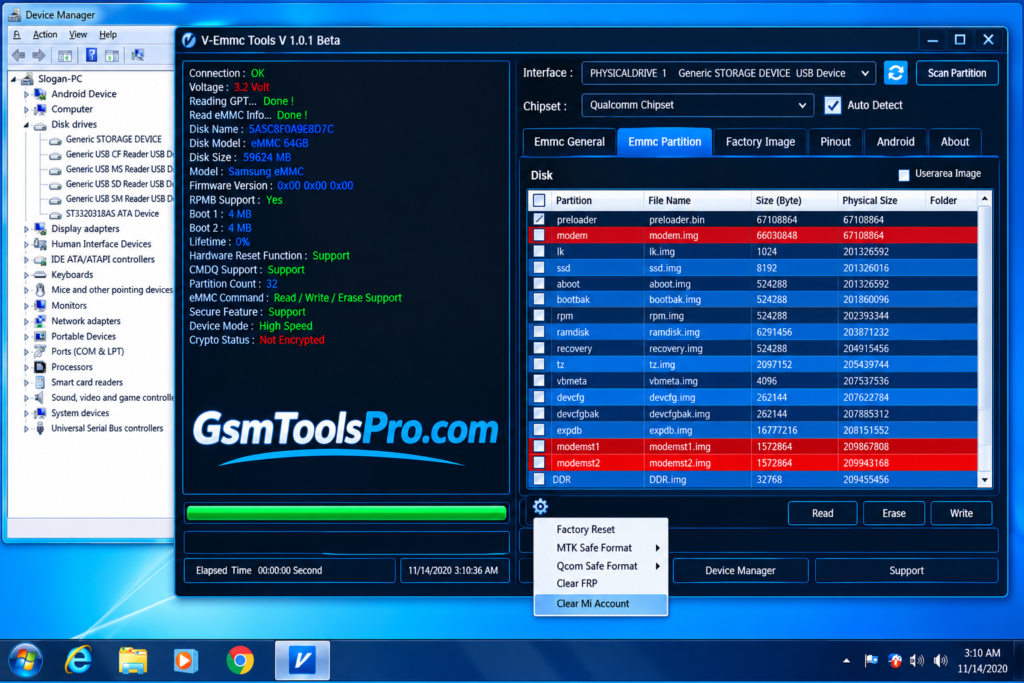
What Is the V-Emmc Tool?
V-Emmc Tool is a lightweight Windows software for Android smartphone repair. It uses the ISP (In-System Programming) method to read and write eMMC/UFS dump files, repair dead boot issues, and reset screen or FRP locks. It supports devices like Samsung, Oppo, Vivo, Realme, etc and chipsets like Qualcomm and EMMC. The tool is designed to be user-friendly and operate quickly.
Key Features Of V-Emmc Tool
Flash firmware
The tool allows you to flash firmware when the device is locked and stuck on the screen due to corrupted firmware and files, making your device fully functional. Furthermore, you can also install firmware for your device with this tool.
Switch to DL mode
This feature helps to revert the mode of communication or connection between the PC and the Mobile device for faster repair.
Setting port
It allows you to select and set the desired port number that helps to detect the exact ID of your device and its exact location
Read and Write Operations
V-Emmc Tool reads and writes eMMC partitions, boot areas, and user data to help technicians repair Android smartphones and tablets.
Dead Boot Repair
Repair dead or bricked Android phones by writing compatible firmware or dump files directly to eMMC storage through ISP.
Partitioning and Cloning
Create raw dumps, manage eMMC partitions, and clone storage data to memory chips for repair and recovery tasks.
ISP (In-System Programming)
ISP connects to eMMC or UFS storage on the motherboard, allowing technicians to access memory without removing the chip.
Userfriendly interface
V-Emmc Tool offers a simple, user-friendly interface that helps technicians perform eMMC read/write operations, manage partitions, and repair Android devices easily.
Download information
| Component | Details |
| Tool Name | V-Emmc Tool |
| Version | v1.0 Beta |
| File Size | 75.34 MB |
| Platform | Windows |
| File Type | ZIP Archive |
System Requirements
| Component | Minimum Requirements |
| Operating System | Windows 7, 8, 10, or 11 |
| Processor | Dual-Core processor |
| RAM | 2 GB |
| Free Storage | 500 MB |
| ISP Adapter | Required |
| eMMC/UFS Connection | Compatible ISP or eMMC/UFS adapter |
| USB Drivers | Required device drivers |
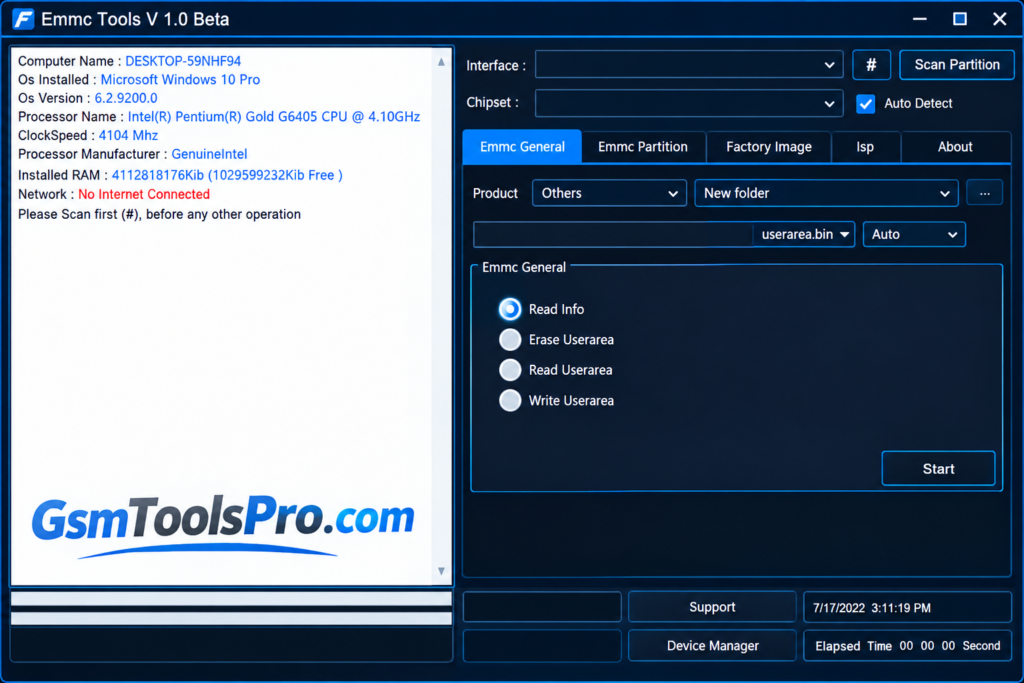
How to Download, Install, and Use V-Emmc Tool v1.0?
- Download the Tool: Download V-Emmc Tool v1.0 from a trusted source and extract the ZIP file.
- Install Drivers: Install the required USB, Qualcomm, MediaTek, and ISP adapter drivers for your device and hardware.
- Open the Tool: Run V-Emmc-Tools.exe on your Windows computer.
- Connect the Chip: Connect the eMMC/UFS storage using a compatible ISP connection or adapter.
- Write a Dump: Select Write Userarea, locate the compatible dump file, and click Start.
- Reset User Lock: Open eMMC Partition > Special Task > Factory Reset and follow the on-screen instructions.
- Clear FRP Lock: Navigate to eMMC Partition > Special Task > Clear FRP and proceed only on devices you own or are authorized to service.
Pros and Cons
| Pros | Cons |
| Free and lightweight Windows utility. | Requires a compatible ISP adapter or eMMC/UFS hardware. |
| User-friendly interface. | Requires technical knowledge of ISP connections. |
| Supports eMMC read and write operations. | Compatibility varies by device model and chipset. |
| Helps repair dead boot issues using dump files. | Incorrect dump files can damage data or device software. |
| Supports factory reset and FRP-related functions. | Requires proper USB drivers and setup. |
| Supports selected Samsung, Oppo, Vivo, and Realme devices. | Primarily designed for Windows computers. |
Also Read: SN Write Tool v2.1408 Download MediaTek IMEI Tool Updated Version
Conclusion
V-Emmc Tool v1.0 is a Windows-based Android repair setup for technicians working with eMMC and UFS storage. It supports read/write operations, dump flashing, partition management, and selected dead boot repair tasks through ISP connections. The tool can help service Samsung, Oppo, Vivo, and Realme devices. For safe results, use the correct drivers, a compatible ISP adapter, and verified dump files to reduce the risk of data loss or storage damage.
FAQ’s
Why is V-Emmc not detecting the eMMC chip?
Check the ISP pinout, CLK, CMD, DAT0, power supply, and adapter connection. Incorrect wiring or voltage can prevent chip detection.
Can this Tool repair a dead-boot Android phone?
Yes, it may help repair supported dead-boot issues by writing a compatible eMMC dump, but hardware damage needs further diagnosis.
Why does eMMC read or write fail during repair?
Common causes include poor ISP connections, incorrect voltage, bad eMMC health, incompatible dump files, or unsupported hardware.
Do I need an ISP adapter to use V-Emmc Tool?
Yes, you need compatible ISP hardware or an eMMC adapter to connect to supported storage chips for read and write operations.
Can I use this software to write a dump file?
Yes, the tool is reported to support eMMC dump writing. Always verify the dump file and device compatibility before writing.
Can V-Emmc Tool work with every Samsung, Oppo, or Vivo phone?
No, support depends on the device model, chipset, memory type, and connection method. Check compatibility before starting the repair.
![Xiaomi Tool v2026.01.18 Use for Mi Account Setup Download [2026] (2)](https://gsmtoolspro.com/wp-content/uploads/2026/09/Xiaomi-Tool-v2026.01.18-Use-for-Mi-Account-Setup-Download-2026-2-768x576.png "Xiaomi Tool v2026.01.18 Use for Mi Account Setup Download [2026] 4")

![TTA EDL Tool V1.0.4 Latest Version Download [2026]](https://gsmtoolspro.com/wp-content/uploads/2026/09/TTA-EDL-Tool-V1.0.4-Latest-Version-Download-2026-2-768x576.png "TTA EDL Tool V1.0.4 Latest Version Download [2026] 8")