TSM Tool Pro v2.4.1 Free Download for Windows Latest 2026 [100% working]
Android repair can become difficult when FRP locks, MDM restrictions, screen locks, or firmware problems block a device. TSM Tool Pro brings key servicing functions into one Windows solution, using ADB, Fastboot, EDL, and Download Mode to help technicians handle supported Samsung, Xiaomi, Motorola, and other Android devices more efficiently.
What Is TSM Tool Pro and What Does It Do?
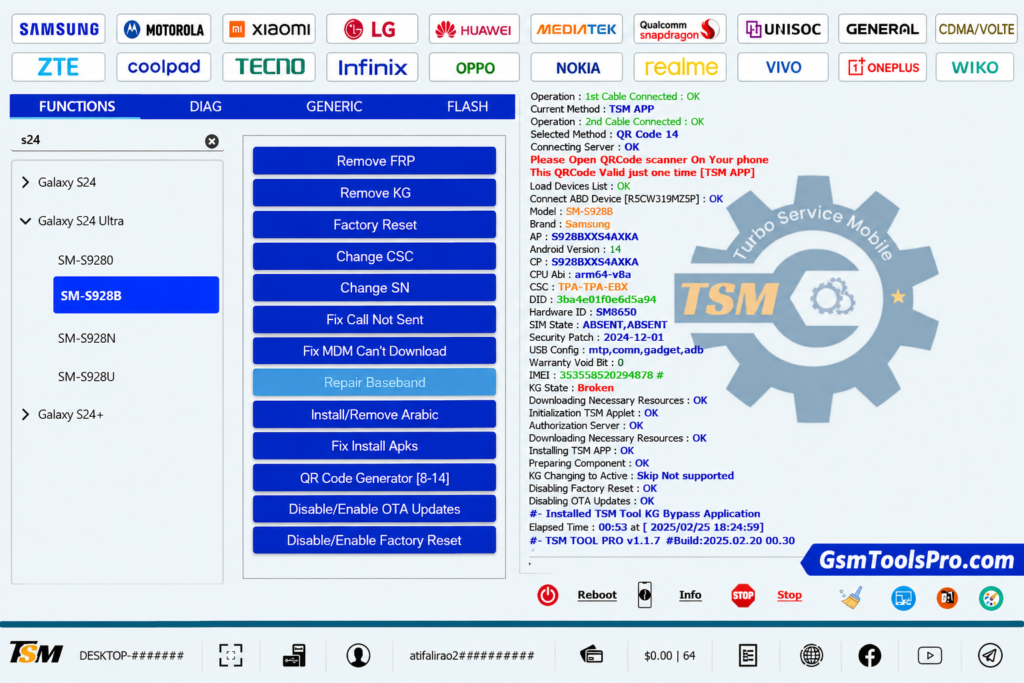
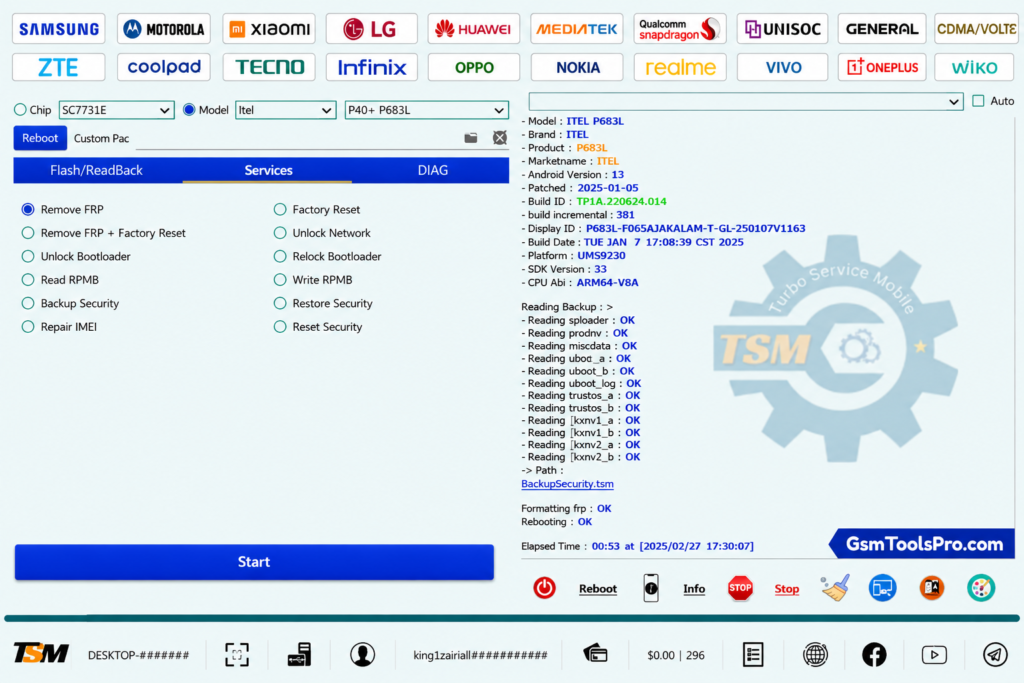
TSM tool is a Windows Android servicing tool that helps to solve issues like FRP Locks, repair, unlock, and maintain smartphones. The tool works with various methods, including ADB, Fastboot, Download Mode, EDL Mode, etc. The tool supports various brands like Motorola, Samsung, and Xiaomi. TSM operates on mobile issues such as FRP removal, firmware flashing, screen lock reset, factory reset, etc. Consequently, because of its user-friendly, lightweight, and fast speed work makes it is the best servicing GSM tool in 2026.
TSM Tool Pro Features for Android Servicing
Complete Android System Repair
It supports all system diagnostics and solutions for Android devices for issues like FRP Bypass, Screen Unlock, Firmware Flashing, IMEI Repair, MDM Removal, etc.
ADB & Fastboot Support
TSM Pro supports ADB & Fastboot Support mode to connect with a mobile device, making a better link between the mobile and your PC.
Screen Lock Removal
The Tool supports a screen lock removal feature which unlock the device without losing your personal data.
User-friendly and Lightweight
The TSM Tool Pro’s latest version comes with a user-friendly interface and lightweight setup, which is better for beginners and also runs on low-end computers.
What’s new in the Updated Version
- Updated software package to the latest v2.4.1 release.
- Introduced a new KG removal function.
- Added Samsung QR Code support for Android 14 devices.
- Added compatibility with MediaTek Protocol V6.
- Supports Samsung MDM/KG removal through EDL, ADB, and QR Code methods.
- Resolved the “Can’t Download OneClick EDL Mode” MDM error.
- Added the OnePlus Open Diag Menu option.
- Improved overall performance with various bug fixes and stability updates.
- Added Xiaomi FRP removal through Sideload mode.
TSM Tool Pro Supported Brands
TSM Tool supports a wide range of devices from 50+ brands; some of them are given below.
- Samsung
- Xiaomi, Redmi, POCO
- Oppo, Realme, OnePlus
- Huawei, Honor
- Tecno, Infinix, Itel
- Vivo, Nokia, Motorola
TSM Tool Pro System Requirements for Windows
| Component | Minimum Requirement |
| Operating System | Windows 7, Windows 8, Windows 10, Windows 11 |
| Processor | Intel Dual-Core or AMD Dual-Core Processor (or higher) |
| RAM | 4 GB Minimum (8 GB Recommended) |
| Storage | At least 1 GB Free Disk Space |
| USB Drivers | Android USB Drivers Installed |
| USB Cable | Compatible USB Data Cable |
| Permissions | Administrator Privileges Required |
How to Download and Install TSM Tool Pro v2.4.1?
- Get the TSM Tool Pro setup from its trusted official website.
- Temporarily turn off antivirus protection if it blocks the installer.
- Launch the downloaded setup and complete the installation process.
- Install the necessary USB drivers for proper device detection.
- Open TSM Tool Pro and register a free account.
- Sign in using your newly created account.
- Connect your Android phone to the PC with a USB cable.
- Use the available functions for FRP removal, firmware flashing, and device unlocking.
TSM Tool Pro v2.4.1 Download Details & File Information
| Property | Details |
| File Name | TSM Tool |
| File Version | V2.4.1 |
| File Type | ZIP / RAR Compressed File |
| File Size | 199.71 MB |
| Extraction Tool | WinRAR or 7-Zip |
| Password | None |
Also Read: Titan Tool v7.0.0 Download Latest Version Setup 2026 (100% Working)
Conclusion
TSM Tool Pro offers a simple way to solve common Android repair tasks on Windows. With ADB, Fastboot, EDL, and Download Mode support, it can work with firmware flashing, FRP removal, screen lock reset, IMEI repair, and MDM servicing. Its multiple device compatibility and easy interface make it a useful choice for technicians for everyday software repairs.
FAQ’s
Is TSM Tool Pro free to use?
TSM Tool Pro has some free servicing functions, while availability can vary by device, method, and service. Official updates specifically list certain FRP and factory-reset operations as free on supported models.
Does TSM Tool Pro support Android 14, Android 15, and Android 16?
Yes. TSM Tool has documented support for selected Android 14, 15, and 16 devices. Its update history includes Samsung KG servicing for Android 14–16, while newer updates also add Android 16 support for selected Motorola models.
Does TSM Tool Pro support Qualcomm and MediaTek devices?
Yes. The official TSM Tool website lists Qualcomm, MediaTek, Unisoc, and Kirin (Hisilicon) among its supported chipsets. Individual functions still depend on the supported model and service mode.
Does TSM Tool Pro support Samsung devices?
Yes. Samsung is one of the major supported brands, with functions including FRP removal, factory reset, firmware read/write, and KG/MDM servicing on selected models.
Can TSM Tool Pro remove FRP, KG, and MDM locks?
Yes, on supported devices and security versions. Official update logs document FRP removal as well as Samsung KG/MDM operations across different chipsets and Android versions.
Can TSM Tool Pro be used for firmware flashing?
Yes. Firmware read/write and flashing are part of TSM Tool Pro’s documented servicing functions. Support varies by model, chipset, and available service mode.