Cheetah Tool Pro Download Latest v2026.05.02.177.1 [100% Pre-activated version]
Are your work stops due to FRP locks, bootloops, and firmware problems slowing down Android repairs? Cheetah Tool Pro offers Qualcomm, MediaTek, and Samsung Exynos servicing in one Windows solution. With ADB, Fastboot, EDL, and Download Mode support, technicians can handle flashing, FRP resets, factory resets, and other common repair tasks.
![Cheetah Tool Pro Free Download Latest v2026.05.02.177.1 [100% working Pre-activated version]](https://gsmtoolspro.com/wp-content/uploads/2026/08/Cheetah-Tool-Pro-Free-Download-Latest-v2026.05.02.177.1-100-working-Pre-activated-version-1024x683.png "Cheetah Tool Pro Download Latest v2026.05.02.177.1 [100% Pre-activated version] 1")
What Is The Cheetah Tool Pro v2026.05.02.177.1?
Cheetah Tool is an windows based android servicing tool used by technicians in daily servicing. It supports many mobile brands and chipsets, including Qualcomm (QCOM), MediaTek (MTK), and Samsung Exynos. The tool works through ADB, Fastboot, EDL, and Download Mode to communicate with the device. Consequently, due to these features, it solves problems like FRP lock, screen lock removal, firmware flashing, factory reset, bootloader operations, etc. Due to these functions, this tool is best for daily repair tasks.
Key Features of Cheetah Tool Pro
Device Unlocking
The tool allows technicians to unlock forgotten passwords, PIN patterns, etc., and recover the phone without losing the original data.
FRP Removal
Cheetah Software can remove FRP Lock when the device Locks after the factory reset. It uses a safe way to bypass the FRP and make the device normal.
Firmware Flashing
When the device is facing these conditions, like Soft-bricked, critical software bugs, damaged software, or stuck on the startup logo, the Ceetah tool pro helps to solve these issues by flashing the Firmware.
Multi-Brand Support
Devices including Samsung, Xiaomi, Redmi, Huawei, OPPO, Vivo, Nokia, Infinix, Tecno, Google Pixel, and LG are supported by the Cheetah tool, making it the best tool for various brands.
Simple Dashboard
Cheetah Setups comes with a simple, user-friendly interface so beginners can easily operate the tool. Everything is arranged and structured.
ADB and fastboot support
With the help of this ADB and fastboot support feature, the connection between your Android and the PC is made easily. The Tool does not require physical hardware boxes or dongles to connect with devices; instead, it communicates through USB connections, ADB, and Fastboot.
Device Information Reader
The Software alow Tecnitions to read the connected device information and show the info, including Device Model, Android Version, Security Patch Level, IMEI Information, Build Number, and Hardware Details. Making the process fast and making a decision about the solution.
What’s New in the Latest Version 2026 (v2026.03.06.175.0)
- World’s First Samsung SM-A076B Support
- Qualcomm EDL 9008 Enhancements
- Upgraded bootloader unlocking capabilities
- support for MediaTek MT6835 security
- Samsung MediaTek V6 advanced authorization
- Added a Reset MDM feature specifically for Motorola devices
- Enabled features to reset MCK (Master Code Key)
System Requirements for Cheetah Tool Pro
| Component | Minimum Requirement | Recommended |
| Operating System | Windows 7, 8, 10, or 11 | Windows 10/11 |
| Processor | Intel Dual-Core or AMD Dual-Core | Intel/AMD Multi-Core |
| RAM | 4 GB | 8 GB or higher |
| Storage | 1 GB free disk space | 2 GB or more free space |
How to Download Cheetah Tool Pro?
- Visit gsmtoolspro.com or the official Cheetah Tool website.
- Open the Cheetah Tool Pro download page.
- Click the Download Here button.
- Ignore any advertisement download buttons.
- Wait for the download to finish.
- Locate the downloaded setup file on your Windows PC.
How to Install Cheetah Tool Pro
- Configure the Downloaded Setup File
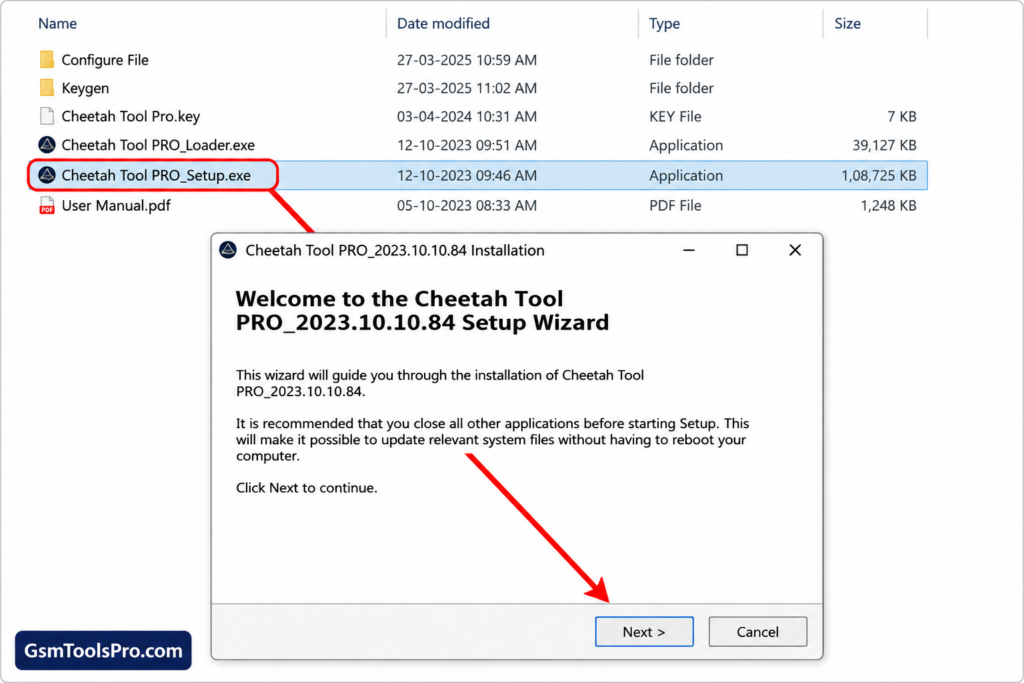
2. Install Cheetah Tool Pro
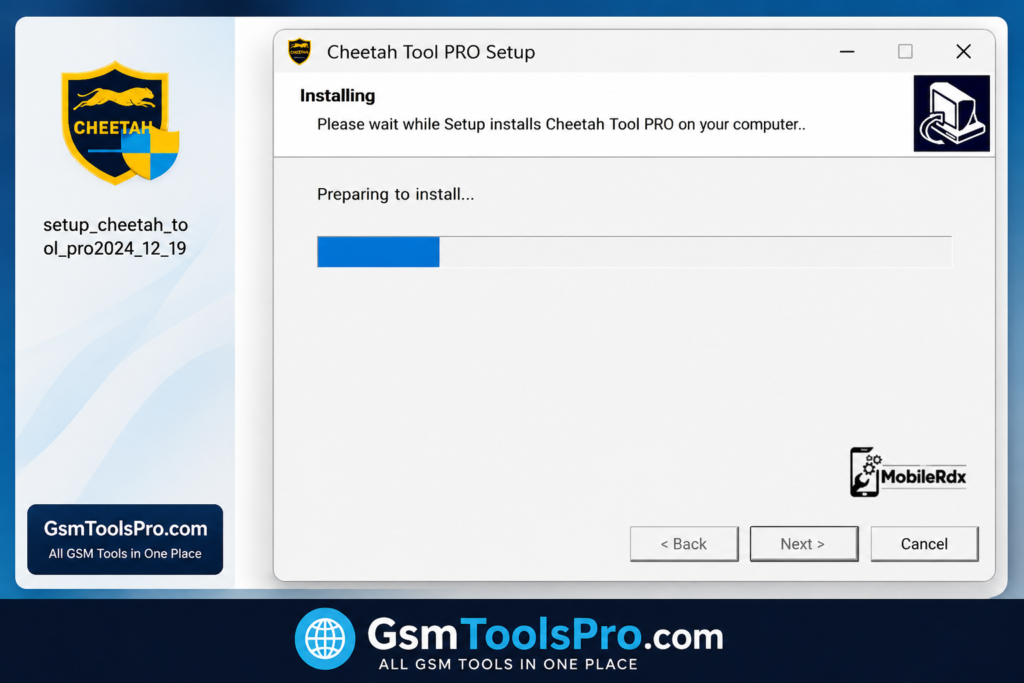
3. Install the Loader
4. Generate Activation Key
5. Run Cheetah Tool Pro And Login
Latest Updated version Details with Their release Date
| Version | Release Date | Key Highlights |
| V2026.06.30.183.0 | June 30, 2026 | Added firmware flashing, network unlock, carrier relock for Samsung Galaxy S25/S24, MCK Reset, security rebuild, Qualcomm and UNISOC support, plus overall stability improvements. |
| V2026.06.06.180.0 | June 6, 2026 | Introduced Samsung MediaTek V6 authorization, bootloader decode/lock functions, expanded Samsung BIT revisions, and Motorola MDM Reset support. |
| V2026.05.23.178.0 | May 23, 2026 | Added mandatory device model selection, MediaTek MT6835 security support, TCL and Alcatel firmware operations, plus authorization for Ulefone, Doogee, Oukitel, and Blackview devices. |
| V2026.05.02.177.1 | May 2, 2026 | Added 2025 MediaTek Preloader security support, Tecno, Infinix, iTel, Motorola, Xiaomi & Samsung (QDL/9008) firmware flashing, FRP Reset, Factory Reset, and Meta File Manager. |
| V2026.05.02.177.0 | May 2, 2026 | Expanded Samsung Galaxy A Series support, improved bootloader unlock, and fixed MediaTek (MTK)-related bugs. |
| V2026.04.15.176.0 | April 15, 2026 | Added Qualcomm chipset support, improved FRP reset for OPPO and Realme, and enhanced firmware flashing stability. |
Also Recommended: TFT Tool Pro v6.3.1.1 Download Latest Version Setup [100% Activated] For Windows 2026
Conclusion
Cheetah Tool Pro is the best servicing and repairing software used to solve mobile issues like FRP locks, Locked devices, firmware issues, etc by using ADB and Fastboot mode. It communicates with Android devices and makes the process easy to complete. The Cheetah Tool Pro supports various mobile brands and chipsets, making it a diverse tool for daily servicing tasks for technicians.
FAQ’s
Is Cheetah Tool Pro free to use?
No, Cheetah Tool Pro requires a paid 3, 6, or 12-month activation. Some server-based services may also need separate credits.
Do I need a hardware box or dongle?
No, Cheetah Tool Pro is software-based and does not require a physical box or dongle. It works through a Windows PC and a USB connection.
Can it read pattern locks without deleting data?
Only on older Android versions, roughly Android 2.3 to 7. Modern encrypted phones usually require a factory reset, which deletes user data.
Cheetah Tool Pro vs Unlock Tool — which is better?
Unlock Tool is generally preferred by technicians because of its wider support and more frequent updates. Cheetah Tool Pro can still work as a secondary repair option.
Can Cheetah Tool Pro bypass Samsung FRP on Android 16?
Yes, the tool supports Samsung FRP servicing on Android 16 through MTP-based methods. Support can vary by model and security patch.
What are the main risks of using Cheetah Tool Pro?
Incorrect flashing or security operations can cause boot loops, data loss, or even device failure. Always verify the exact model and back up important data before servicing.
![TTA EDL Tool V1.0.4 Latest Version Download [2026]](https://gsmtoolspro.com/wp-content/uploads/2026/09/TTA-EDL-Tool-V1.0.4-Latest-Version-Download-2026-2-768x576.png "TTA EDL Tool V1.0.4 Latest Version Download [2026] 8")