SP MDT Tool v6.2316.00 Download Setup for Windows [2027]
Is your MediaTek phone stuck on startup or facing firmware errors? SP MDT Tool v6.2316.00 helps technicians flash stock firmware, manage scatter files, and connect multiple MTK devices through a multiport interface for efficient device servicing.
What is SP MDT Tool?
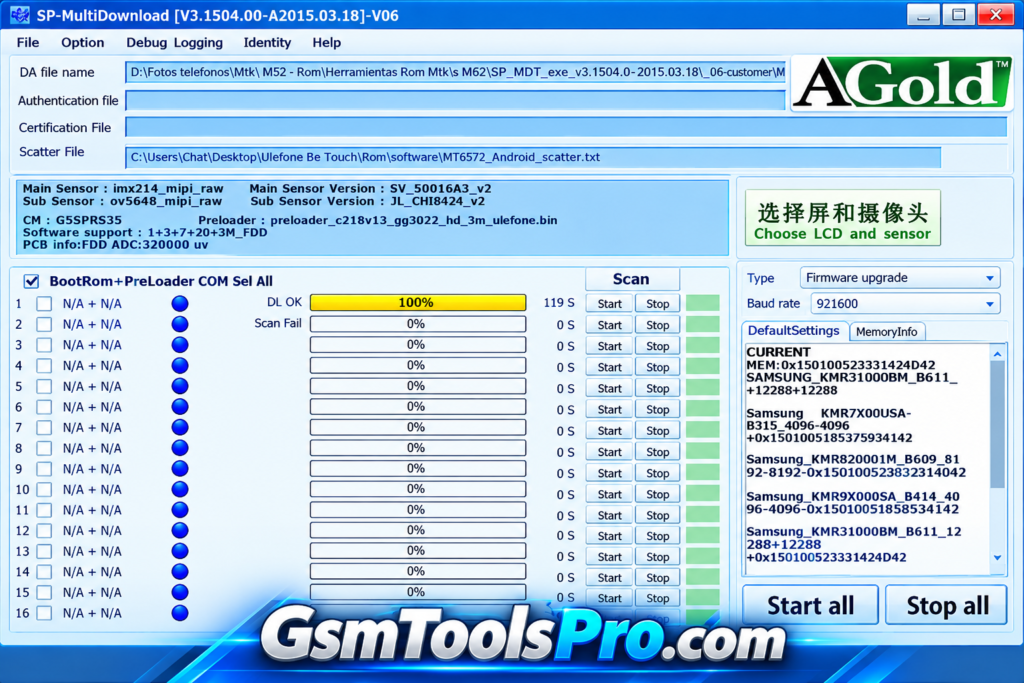
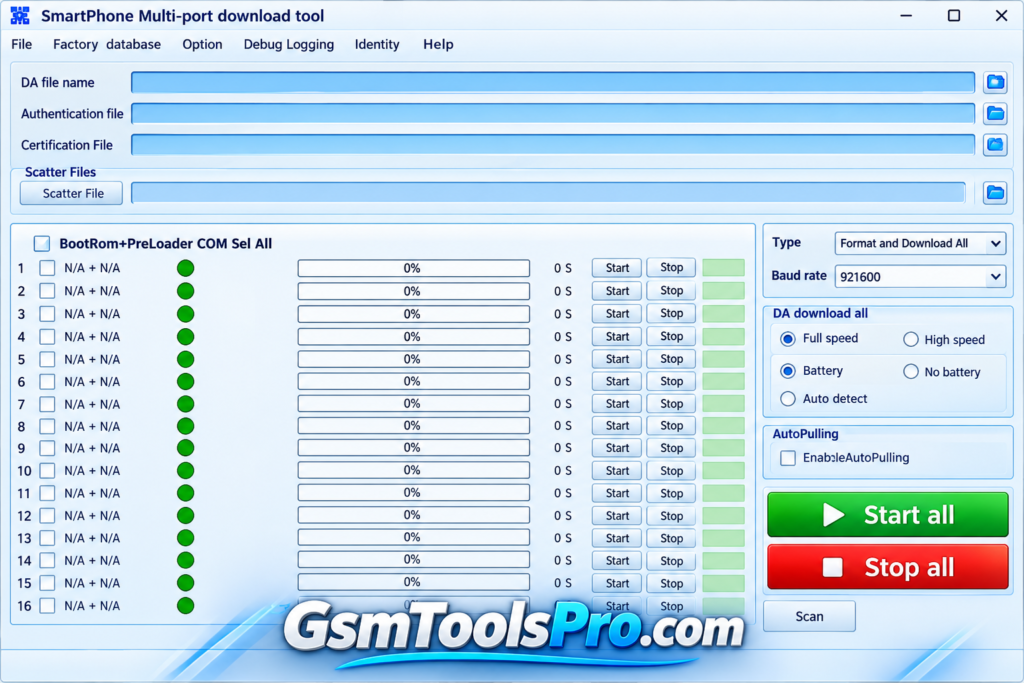
SP MDT Tool is a MediaTek firmware flashing software designed for Android smartphones and tablets powered by MTK chipsets. The tool helps technicians update device firmware, recover software-damaged devices, and manage multiple device connections through a multiport interface. It supports scatter file selection and provides settings for authentication files, certification files, baud rate, and download modes during firmware operations.
Key Features of SP MDT Tool
Firmware Flashing
The tool helps flash stock firmware on MediaTek devices, helping technicians update Android software and resolve certain firmware-related problems.
Scatter File Flashing
It uses scatter files to identify device partitions and memory layouts, helping users select the correct firmware files for flashing.
Unbricking Devices
The software can help recover MediaTek devices affected by failed firmware updates or startup problems by flashing the correct firmware.
Multi-Port Flashing
MDT Tool supports connecting multiple MediaTek devices through a multiport interface, helping technicians manage firmware operations more efficiently.
Preloader Image Flashing
SP Tool supports preloader-related flashing operations on MediaTek
devices, helping technicians work with essential startup components during firmware servicing.
Memory Testing
The SP MDT includes memory-testing options to check RAM and NAND flash storage, helping technicians investigate hardware-related memory issues.
Secure and Non-Secure Boot Support
It provides options for MediaTek devices with secure and non-secure boot configurations, depending on the device and tool version.
Preloader and Bootloader Options
SP MDT Tool provides preloader and bootloader settings for MTK devices, allowing technicians to configure relevant options before starting firmware operations.
Firmware Download Modes
SP MDT Tool offers firmware download options, including format-and-download operations, so users can choose the right mode.
Progress Monitoring and Logs
SP Tool displays operation progress, status information, and logs during firmware tasks, helping technicians monitor flashing and identify errors.
Download Information
| Information | Details |
| Tool Name | SP MDT Tool |
| Version | v6.2316.00 |
| File Size | 15.16 MB |
| Developer | MediaTek |
System Requirements
| Requirement | Minimum Details |
| Operating System | Windows 7, 8, 10, or 11 |
| Processor | 32-bit or 64-bit compatible processor |
| RAM | 2 GB |
| Free Storage | 1 GB |
| USB Connection | USB port and data cable |
| USB Drivers | MediaTek USB Driver |
| Firmware | Compatible MediaTek firmware files |
How to Download, Install, and Use SP MDT Tool
- Download SP MDT Tool: Download the package from a trusted website.
- Extract the Files: Extract the downloaded ZIP package and open the tool.
- Install USB Drivers: Install the required MediaTek USB drivers so Windows can detect your device.
- Prepare Firmware: Select the correct firmware files and scatter file for your compatible MediaTek device.
- Configure Settings: Review the download mode, authentication files, and other available settings.
- Connect Your Device: Connect your device to the computer using a compatible USB data cable.
- Start the Operation: Begin the selected firmware operation and monitor its progress.
- Check the Logs: Review the operation status and logs to identify errors or confirm completion.
Pros and Cons
| Pros | Cons |
| Supports firmware flashing on compatible MediaTek devices. | Incorrect firmware can cause boot problems or device failure. |
| Uses scatter files to identify firmware partitions. | Unsupported scatter files may cause flashing errors. |
| Multiport interface helps technicians flash multiple devices. | Requires compatible USB drivers and correct device connections. |
| Includes RAM and NAND memory-testing options. | Advanced settings may be difficult for beginners. |
| Provides progress indicators and operation status. | Formatting operations can erase user data. |
Also Read:Download QGDP Tool V3.2.6 Activated CPB Flash Tool
Conclusion
SP MDT Tool is useful software for flashing firmware on MediaTek devices. It offers scatter file support, multiport flashing, and memory-testing options for technicians. The tool can also help recover devices affected by failed firmware operations. Before using SP MDT Tool, check the device and select the correct firmware to avoid errors. Download the suitable version from GSMToolsPro to manage MediaTek firmware tasks.
FAQ’s
Why is SP MDT Tool showing an invalid scatter file error?
This error may occur when the scatter file is unsupported, incorrect, or made for a different MediaTek chipset.
Why is SP MDT Tool not detecting my phone?
Check the MediaTek USB drivers, USB cable, connection, and device power state. Also, make sure the correct COM port is selected.
Does SP MDT Tool support all MediaTek devices?
No. Compatibility depends on the device’s MediaTek chipset, firmware format, and tool version. Always check compatibility before flashing.
Can SP MDT Tool fix a bricked MediaTek phone?
It may help recover a bricked phone by flashing compatible firmware, but success depends on the cause of the problem and device condition.
Why does SP MDT Tool show a COM port scanning error?
The error may occur when the preloader port is not detected correctly. Check the USB connection and follow the troubleshooting steps for your specific error.
Will SP MDT Tool erase my phone data during flashing?
Yes, some flashing modes, especially format-and-download, can erase user data. Back up important files before starting any operation.