eMMC DL Tool V5.2.0 Free Download Latesteset Version[100% Working]
Is your Qualcomm Android phone stuck on the boot logo or facing firmware issues? eMMC DL Tool v5.2.0 helps technicians flash stock firmware, switch to Download Mode, set COM ports, and recover smartphones and tablets using a simple Windows interface.
What Is the eMMC DL Tool?
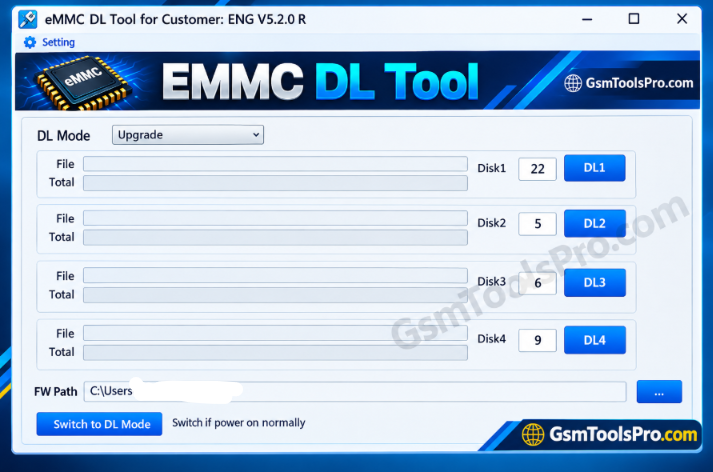
The eMMC DL Tool is a Windows-based software designed to flash stock firmware on Qualcomm smartphones and tablets. It helps technicians reinstall software, recover devices stuck on the boot logo, and fix certain firmware-related issues. The tool also supports device information detection on Android devices. Its features depend on the device model and tool version.
Key Features of eMMC Tool
Flash Firmware
Flash or install stock firmware on Qualcomm smartphones and tablets to fix software issues and restore device functionality.
Switch to DL Mode
Switch to Download Mode to connect devices to a PC for firmware flashing and recovery.
Set Port
Manually select the correct COM port to help the eMMC DL Tool communicate with your connected device.
Simple Interface
Use the straightforward interface to access firmware flashing, connection modes, and port settings without complicated steps.
Qualcomm Device Support
Flash stock firmware on supported Qualcomm-powered Android devices to resolve certain software and boot-related problems.
Windows Compatibility
Run the eMMC DL Tool on Windows to flash firmware on Android smartphones and tablets.
Free to Use
Use the eMMC DL Tool without a software purchase fee, subject to the version’s distribution terms.
Download Information
| Specification | Details |
|---|---|
| Tool Name | eMMC DL Tool |
| Version | v5.2.0 |
| File Size | 1.37 MB |
| File Type | ZIP |
| Developer | Foneric, Inc. |
| License | Freeware |
System Requirements
| Component | Minimum Requirements |
|---|---|
| Operating System | Windows XP, Vista, 7, 8, 8.1, 10 |
| Processor | Not officially specified |
| RAM | Not officially specified |
| Free Storage | Sufficient space for the tool and firmware |
| USB Connection | Required |
| USB Drivers | Compatible Qualcomm USB drivers |
| Device Support | Supported Qualcomm-based smartphones and tablets |
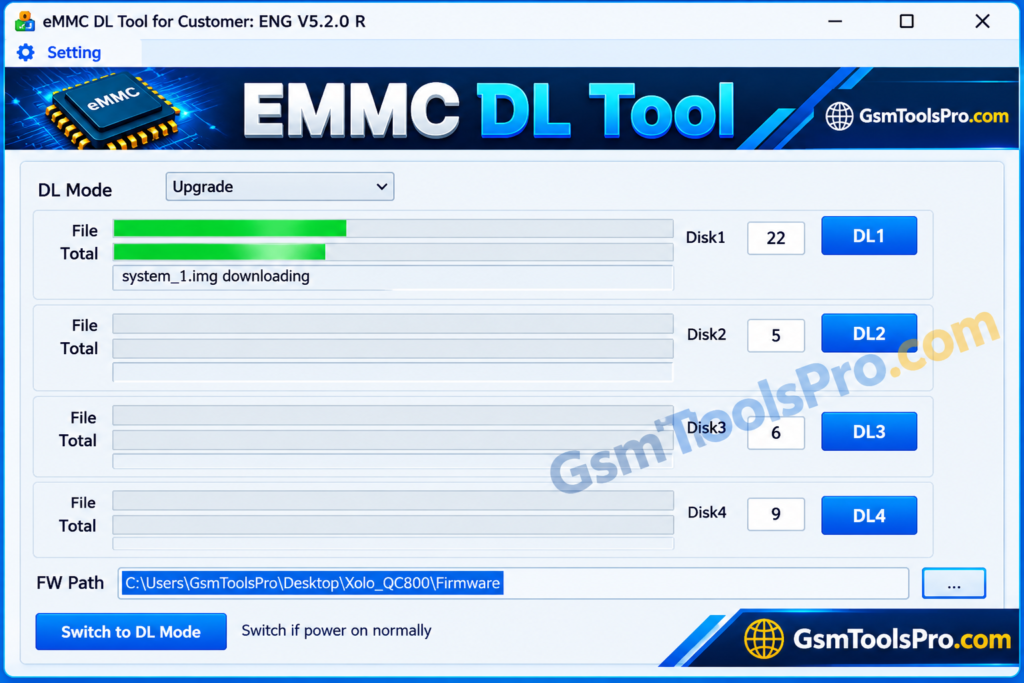
How to Download and Install eMMC DL Tool v5.2.0
- Visit a trusted source and download the eMMC DL Tool v5.2.0 package.
- Choose the version that matches your Windows system, if separate versions are available.
- If the file comes in ZIP format, extract it using WinRAR or 7-Zip.
- Open the extracted folder and locate eMMC_DL_Tool.exe.
- Right-click the executable and select Run as administrator.
- Follow the on-screen instructions if an installation wizard appears.
- Install the compatible Qualcomm USB drivers required to connect your device to the computer.
- Once setup is complete, open the tool and check that it is ready to detect your supported device.
Read Full Guide: How to Use eMMC DL Tool to Flash Stock Firmware [2026 Guide]
Pros and Cons
| Pros | Cons |
|---|---|
| Free to download and use. | Supports Qualcomm-based devices only. |
| Simple interface for firmware flashing. | Flashing firmware erases device data. |
| Supports stock firmware installation. | Requires compatible Qualcomm USB drivers. |
| Allows manual COM port selection. | Incorrect firmware may cause flashing errors. |
| Supports Windows 32-bit and 64-bit systems. | Not every Qualcomm device is supported. |
| Can help recover certain software-related issues. | Incorrect flashing steps may leave the device unusable. |
Also Read: V-Emmc Tool v1.0 Download for Windows [Updated Version]
Conclusion
The eMMC DL Tool helps technicians flash stock firmware on Qualcomm smartphones and tablets, set COM ports, and use Download Mode for device recovery. Before flashing, back up important data, charge the device, and select the correct firmware. Install compatible Qualcomm USB drivers and follow the flashing steps carefully to reduce the risk of software errors or device damage.
FAQ’s
What is DL Tool used for?
eMMC DL Tool is a Windows utility used to flash stock firmware on supported Qualcomm smartphones and tablets.
Does eMMC DL support MediaTek devices?
No, eMMC DL Tool is designed for supported Qualcomm-based devices and does not support MediaTek firmware flashing.
Does eMMC DL erase user data?
Yes, firmware flashing may erase your data and settings. Always back up important files before starting.
Why is my phone not detected by eMMC DL Tool?
Check the Qualcomm USB drivers, USB cable, COM port, and connection mode. Ensure your phone is in the required Download Mode.
How do I flash firmware using eMMC?
Install the required drivers, load the correct stock firmware, select the COM port, connect your device in Download Mode, and click the DL button.
Is eMMC DL Tool v5.2.0 free to use?
eMMC DL Tool is distributed as a free utility. Download it from a trusted source and verify the file before running it.
![OST Tool V6.3.7 Download For Nokia Firmware 2026 [100% Working].](https://gsmtoolspro.com/wp-content/uploads/2026/09/OST-Tool-V6.3.7-Download-For-Nokia-Firmware-2026-100-Working-768x576.png "OST Tool V6.3.7 Free Download Nokia Firmware 2026 [Activated] 6")