
Amlogic Customization Tool v10.1.0 Download Setup for Windows
Are you struggling to customize Android TV box firmware or remove unwanted system apps? Amlogic Customization Tool v10.1.0 helps you unpack, edit, and repack compatible Android firmware for Amlogic, Rockchip, and Allwinner devices, with options to modify system apps, boot logos, animations, and build.prop settings.
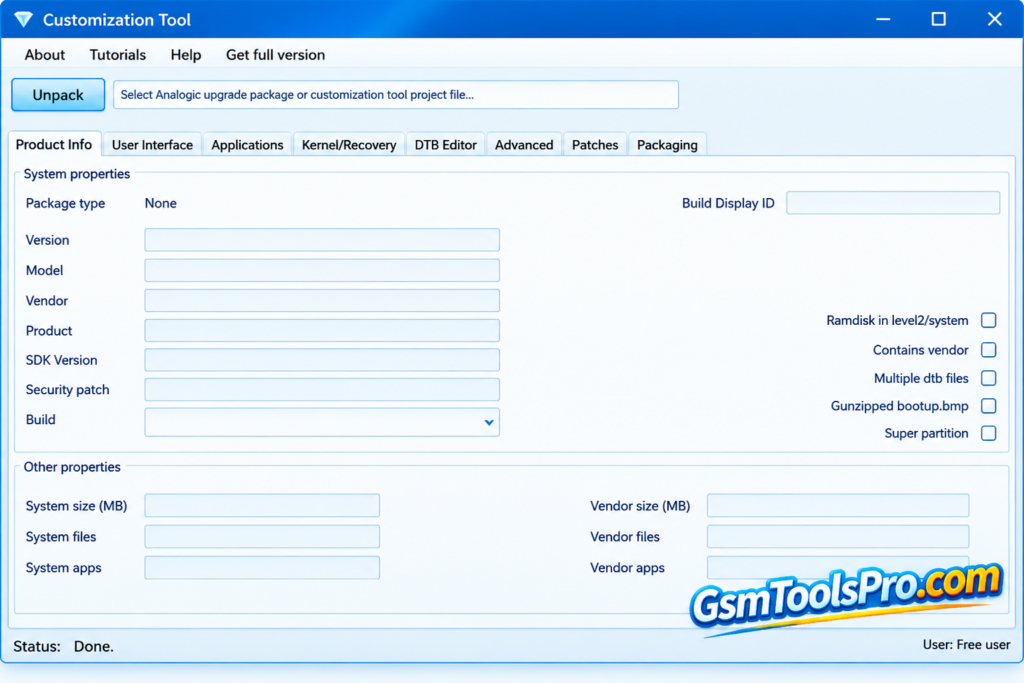
What is the Amlogic Customization Tool?
Amlogic Customization Tool is a firmware editing software for Windows that helps users unpack, modify, and repack Android firmware for Amlogic, Rockchip, and Allwinner devices. It allows users to customize system apps, boot logos, boot animations, wallpapers, and other firmware files before rebuilding the image. The tool is mainly useful for Android TV box developers and advanced users who want to personalize or modify firmware.
Key Features of Amlogic Customization Tool
Firmware Unpacking and Repacking
The tool helps unpack Android firmware files, modify system components, and repack them into a flashable image for devices using the Amlogic Customization Tool.
Android Version Compatibility
It works with firmware for Android 4.x to Android 14, making it useful for customizing devices running older or newer Android versions.
Custom Application Integration
Add custom applications and required services to Android firmware before repacking, helping users prepare a system image for specific needs.
Root Access and System Tweaks
Modify firmware settings to enable root access and apply system tweaks, giving advanced users more control over Android features and behavior.
Firmware Upgrades and Downgrades
You can customize firmware packages for Android version upgrades or downgrades, while checking device compatibility to reduce the risk of boot or stability issues.
Build.prop Editing
Edit the Android build.prop file to change system properties, such as device settings and display behavior, before rebuilding the firmware image.
Download Information
| Specification | Details |
| Tool Name | Amlogic Customization Tool |
| Version | v10.1.0 |
| File Name | CustomizationTool_setup_v2.0.10.zip |
| File Size | 25.4 MB |
| File Format | ZIP |
| Platform | Windows |
| Password | TOOL123 |
System Requirements
| Component | Requirement |
| Operating System | Windows |
| RAM | Not officially specified |
| Processor | Not officially specified |
| Free Storage | At least enough space for the 25.4 MB ZIP file and extracted files |
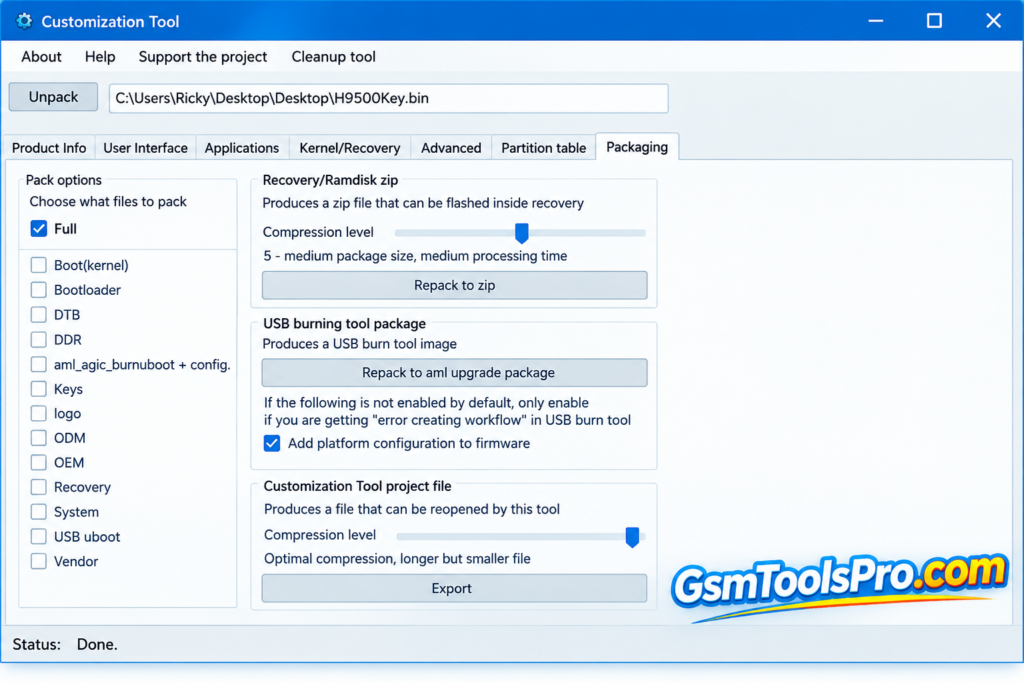
How to Download Amlogic Customization Tool
- Visit the Amlogic Customization Tool download page or download from the given link.
- Find CustomizationTool_setup_v2.0.10.zip in the file list.
- Click the file name and select the download option.
- Once the ZIP file downloads, extract it using WinRAR or 7-Zip.
- Open the extracted folder and run CustomizationTool_setup_v10.1.0.exe.
- Follow the setup instructions to install the tool on your Windows PC.
- Launch the Amlogic Customization Tool and load a compatible firmware image to begin customization.
Pros and Cons
| Pros | Cons |
| Unpacks and repacks compatible Android firmware images. | Incorrect modifications can prevent a device from booting. |
| Supports firmware customization for Amlogic, Rockchip, and Allwinner devices. | Compatibility depends on the firmware and device model. |
| Allows users to modify system apps, boot logos, and boot animations. | Some firmware components require advanced technical knowledge. |
| Supports customization of firmware based on different Android versions. | Newer firmware formats may have limited support. |
| Helps remove unwanted apps and add custom system applications. | Repacked firmware may require testing before flashing. |
| Useful for Android TV box developers and firmware technicians. | Firmware changes can cause data loss or device issues. |
Also Read: Z3x Samsung Tool PRO V45.14 Download Setup For Windows [Free 2026]
Conclusion
Amlogic Customization Tool helps users customize Android firmware for Amlogic, Rockchip, and Allwinner devices. It can unpack and repack firmware, add or remove system apps, edit system files, and change boot logos and animations. The tool supports various Android versions, but some features depend on the version and license. Always check firmware compatibility before making changes, as incorrect modifications may cause boot problems or data loss.
FAQ’s
What is Amlogic Customization Tool?
Amlogic Customization Tool helps users unpack, edit, and repack compatible Android firmware for supported TV boxes and other devices.
Which devices does Amlogic Tool support?
It supports firmware for Amlogic, Rockchip, and Allwinner devices. Actual compatibility depends on the firmware and tool version.
Can I add or remove system apps?
Yes, supported firmware can be customized by adding or removing system APKs before repacking the firmware image.
Can I change the boot logo and animation?
Yes, the tool supports changing boot logos and animations for compatible firmware, depending on the available features and version.
Why won’t my firmware file open?
The file format may not be supported, or the firmware package may use a different structure. Renaming its extension may not solve the problem.
Is Amlogic Customization safe to use?
It can be useful for firmware editing, but incorrect changes may cause boot failures or data loss. Always keep a backup of the original firmware.
![OST Tool V6.3.7 Download For Nokia Firmware 2026 [100% Working].](https://gsmtoolspro.com/wp-content/uploads/2026/09/OST-Tool-V6.3.7-Download-For-Nokia-Firmware-2026-100-Working-768x576.png "OST Tool V6.3.7 Free Download Nokia Firmware 2026 [Activated] 8")