Download QGDP Tool V3.2.6 Activated CPB Flash Tool
Is your Android phone stuck or facing firmware problems? QGDP Tool helps mobile technicians flash CPB firmware on Android smartphones and tablets. Its Windows interface offers Assembly, Customer, and SMT versions, firmware configuration, and multi-device flashing for up to 15 devices, making stock firmware installation easier.
What is QGDP Tool?
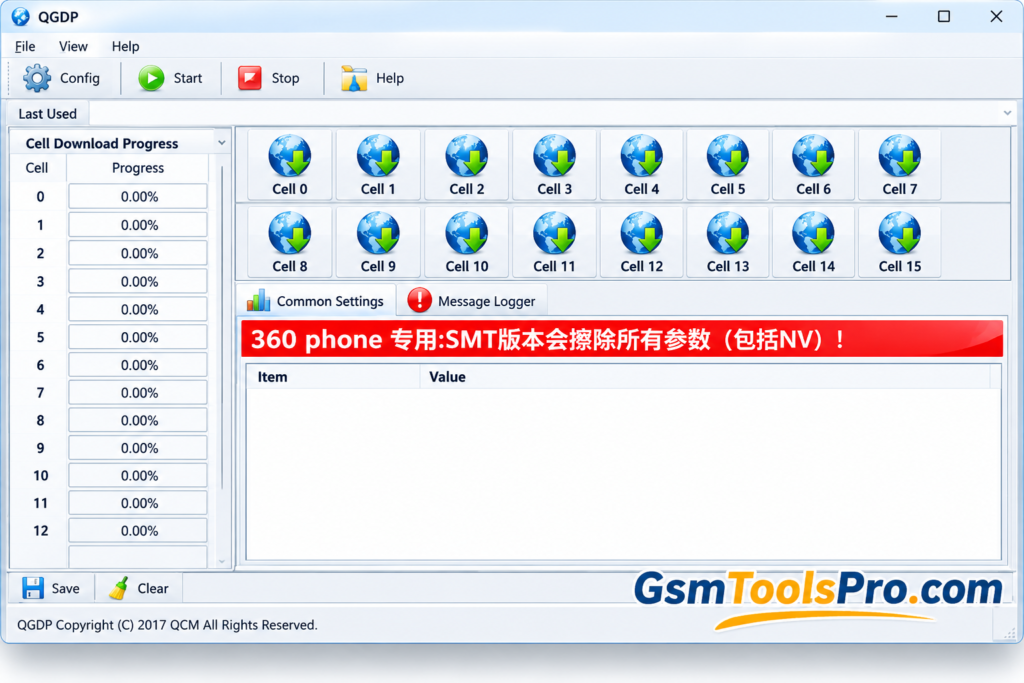
QGDP Tool is a firmware flashing tool for Android smartphones, tablets, and feature phones. It helps mobile technicians install or update stock firmware using CPB firmware files. The tool provides a simple interface with configuration options, device connection controls, and progress monitoring. It supports MediaTek devices and helps users manage firmware installation without using command-line tools.
Key Features of QGDP Tool
Installer and Portable
The Tool offers a standard Windows installer and a portable Assembly V3.2.0 version, allowing users to run the firmware flashing tool without installation.
Multiple Tool Versions
It includes Assembly, Customer, and SMT versions. Users can try another version if their current version fails to recognize a CPB firmware file.
Latest CPB Support
The tool supports CPB firmware files for Android smartphones, tablets, and feature phones, helping technicians install or update stock firmware.
Advanced Configuration Panel
QGDP provides a configuration panel to load firmware files and check device information, including eMMC CID, fuse information, and other hardware details.
Multi-Device Flashing
It supports simultaneous connections to up to 15 devices, helping mobile technicians flash multiple Android devices more efficiently.
Firmware Image Flashing
The software supports CPB firmware flashing and may handle bootloaders, radio files, and other firmware images on compatible devices, depending on the version.
Built-in File Manager and Logs
Use file selection and log monitoring features to locate firmware files, track flashing progress, and troubleshoot errors during device servicing.
MediaTek Device Compatibility
QGDP Tool supports MediaTek devices using chipsets such as MT6571, MT6572, MT6580, MT6582, MT6735, MT6737, MT6761, MT6785, etc.
Download Information
| Information | Details |
|---|---|
| Tool Name | QGDP Tool |
| Version | V3.2.6 Quick Guide |
| File Size | Not verified |
| File Format | Installer / portable version, depending on package |
System Requirements
| Requirement | Recommended Setup |
|---|---|
| Operating System | Windows 10 or Windows 11 |
| Processor | Intel or AMD processor |
| RAM | 4 GB or more |
| Free Storage | 500 MB or more, depending on package size |
| USB Port | Working USB port |
| USB Cable | Compatible data cable |
| Device Drivers | Compatible USB / device drivers |
| Firmware | Correct CPB firmware file |
| Administrator Access | Recommended for installation and driver setup |
| Internet Connection | For downloading the tool and required drivers |
How to Download, Install, and Use QGDP Tool?
- Download the compatible QGDP Tool version from a trusted website.
- Extract the downloaded package or run the installer. Open Qgdp_tool.exe if available.
- Get the correct CPB firmware for your device, install the required USB drivers, and back up important data.
- Launch QGDP Tool and follow the login instructions provided with your version.
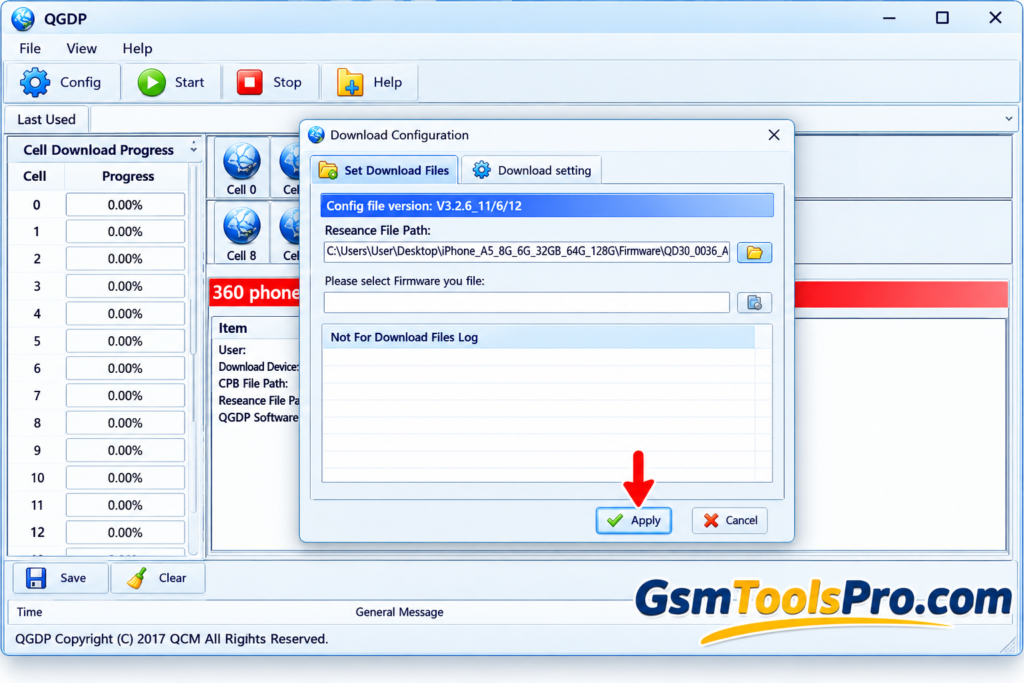
- Open Config, select the compatible .cpb firmware file, and check the device details.
- Prepare your phone according to the manufacturer’s instructions and connect it to the computer using a USB cable.
- Verify the firmware settings and start flashing. Do not disconnect the phone or interrupt the process.
- Wait for the “Download Succeed” message, then restart the phone according to the manufacturer’s instructions.
Pros and Cons
| Pros | Cons |
|---|---|
| Supports CPB firmware flashing on compatible Android devices. | Supports only compatible devices and firmware files. |
| Offers Assembly, Customer, and SMT versions. | Different versions may have different compatibility. |
| Provides a graphical user interface for firmware selection. | Requires correct firmware files and USB drivers. |
| Supports Windows 32-bit and 64-bit systems. | Does not provide native macOS or Linux support. |
| Helps install or update stock firmware. | Flashing can erase personal data. |
| Includes configuration and progress-monitoring options. | Incorrect firmware or interruptions may cause device problems. |
Also Read: FRP Hijacker Tool Latest Version Download [2027 Tested Setup]
Conclusion
QGDP Tool is a useful firmware flashing tool for compatible Android smartphones, tablets, and feature phones. It supports CPB firmware files and offers Assembly, Customer, and SMT versions for different servicing needs. Its simple interface and configuration options help mobile technicians manage firmware installation more easily. Before flashing, choose the correct tool version, install the required USB drivers, and use the firmware to reduce the risk of software errors.
FAQ’s
What is QGDP used for?
QGDP Tool is a Windows utility used to flash compatible Android devices with CPB firmware files. It can help install or restore stock firmware.
Is QGDP free to download?
Yes, QGDP Tool is available as a free download. Choose a compatible version from a trusted source before installing it on your computer.
Which firmware format does QGDP Tool support?
QGDP Tool is mainly designed to flash .CPB firmware files. Always confirm that the firmware matches your device model and supports QGDP.
Why is my phone not detected by QGDP Tool?
The phone may not be detected because of missing USB drivers, an incorrect connection, or device incompatibility. Check the drivers and follow the device-specific connection instructions.
Does QGDP Tool erase phone data during flashing?
Yes, flashing firmware can erase photos, contacts, apps, and other personal data. Create a complete backup before starting the process.
What should I do if QGDP Tool fails to flash firmware?
Check the CPB file, device compatibility, USB drivers, and tool version. If the problem continues, use the flashing method recommended by your device manufacturer.