Download QFIL Tool v2.0.3.5 For Windows Full Working Setup [2026]
Is your Qualcomm phone stuck in a boot loop or failing to install firmware? Download QFIL Tool V2.0.3.5 to flash stock firmware, repair software issues, and restore compatible Xiaomi, Oppo, Vivo, and Huawei devices through EDL Mode.
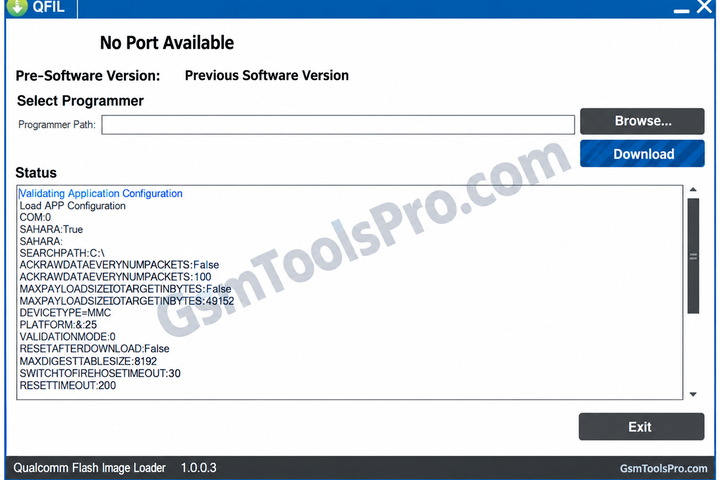
What is the QFIL Tool?
The QFIL Tool (Qualcomm Flash Image Loader) is a Windows-based flashing tool for Qualcomm Snapdragon Android devices. The tool helps users to flash stock firmware, restore damaged software, and resolve other issues through EDL Mode. It solves issues for devices from brands like Xiaomi, Oppo, Vivo, and Huawei. It is useful for mobile technicians and Android users who need to repair firmware or restore a device using the correct Qualcomm firmware files.
Key Features Of QFIL Tool
Flash Firmware
You can flash stock firmware on Qualcomm Snapdragon devices using EDL Mode and the correct firmware files.
Unbrick Devices
It allows you to restore Qualcomm phones affected by failed firmware updates, boot errors, or software problems.
Qualcomm Chipset Support
It works with Qualcomm-based smartphones and tablets from brands like Xiaomi, Oppo, Vivo, and Huawei.
Real-Time Log Box
Monitor firmware flashing progress and review error logs to identify possible problems during the flashing process.
Flat Build and Meta Build
Choose Flat Build or Meta Build according to the firmware package and device requirements.
Portable Application
Run QFIL on a Windows PC after extracting its files, without needing a separate installation.
Advanced Flashing Settings
Adjust available flashing options to match firmware files and device requirements during supported repair tasks.
Firehose Programmer Support
Load Firehose programmer files in .mbn or .elf format for supported Qualcomm firmware packages.
Simple User Interface
Browse firmware files, select the available COM port, load XML files, and monitor the flashing process through a simple interface.
Download Information
| Details | Information |
| Tool Name | QFIL Tool |
| Full Name | Qualcomm Flash Image Loader |
| Latest Listed Version | V2.0.3.5 |
| File Password | 123 |
| File Size | 5.43 MB |
| File Type | ZIP |
System Requirements
| Requirement | Minimum / Recommended |
| Operating System | Windows 7, 8, 10, or 11 (compatibility may vary) |
| Processor | Dual-core CPU recommended |
| RAM | 2 GB minimum recommended |
| Storage | 100 MB free space recommended |
| USB Connection | Working USB port and data cable |
| USB Drivers | Compatible Qualcomm USB / QDLoader 9008 drivers |
| Device Support | Qualcomm chipset-based device |
| Firmware | Correct firmware package for the device model |
| Additional Software | QPST, which includes QFIL in supported versions |
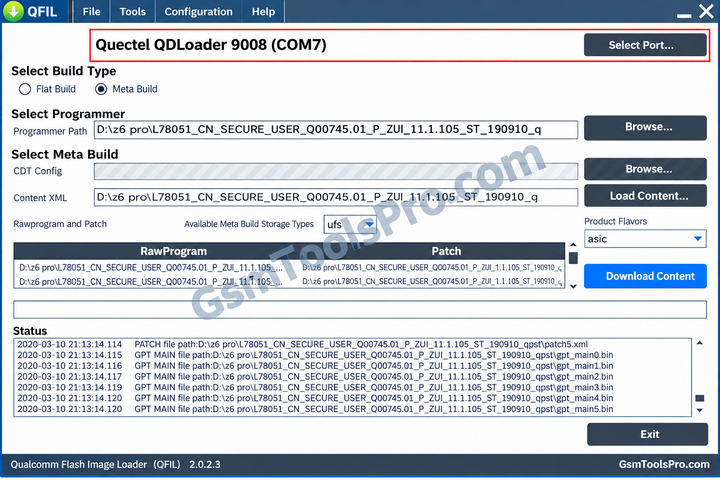
How to Download and Use QFIL Tool v2.0.3.5
- Step 1: Download QFIL Tool v2.0.3.5 from the official website and extract the ZIP file.
- Step 2: Install the required Qualcomm USB drivers and connect your device in EDL (Emergency Download) Mode.
- Step 3: Open QFIL on your Windows PC and select Flat Build.
- Step 4: Click Browse under Programmer Path and select the compatible .mbn or .elf Firehose programmer file.
- Step 5: Click Load XML and select the required rawprogram and patch XML files.
- Step 6: Verify device detection and firmware compatibility, then click Download to start flashing.
- Step 7: Wait for flashing to finish before disconnecting the device. Restart it if it does not reboot automatically.
Pros and Cons
| Pros | Cons |
| Free to use | Supports Qualcomm devices only |
| Simple flashing interface | Requires correct firmware files |
| Supports stock firmware flashing | Incorrect files can damage software |
| Helps recover some bricked devices | EDL Mode may require extra steps |
| Supports .mbn and .elf programmer files | Requires compatible Qualcomm USB drivers |
| Provides flashing logs for troubleshooting | Advanced options may confuse beginners |
Also Read: Amlogic USB Burning Tool v3.3.1 for Windows Free Download
Conclusion
The QFIL Tool is a useful Windows utility for flashing stock firmware and repairing software issues on Qualcomm Snapdragon devices. With support for EDL Mode, Firehose programmer files, and XML firmware files, it helps mobile technicians restore devices and troubleshoot boot problems. Its simple interface and flashing logs make firmware tasks easier. However, users should always choose the correct firmware and Qualcomm USB drivers for their device model to avoid errors or data loss.
FAQ’s
What is QFIL Tool used for?
QFIL Tool is used to flash stock firmware on compatible Qualcomm Snapdragon devices and help repair certain software and boot problems.
How do I use QFIL Tool to flash firmware?
Install the required Qualcomm USB drivers, connect your device in EDL Mode, load the Firehose programmer and XML files, then click Download.
Why is my device not detected in QFIL Tool?
Check the Qualcomm USB drivers, USB cable, COM port, and whether the device has entered EDL Mode correctly.
What files are required for QFIL firmware flashing?
Most standard flashing packages require a compatible Firehose programmer file (.mbn or .elf), rawprogram.xml, and patch.xml.
How do I fix the Sahara Fail error in QFIL Tool?
Check that the Firehose programmer matches your device, reconnect the phone in EDL Mode, and verify the Qualcomm drivers and USB connection.
Does QFIL Tool work with all Android phones?
No. QFIL is designed for compatible Qualcomm chipset-based devices. Support depends on the device model, firmware package, programmer, and security restrictions.