GS Tool v2023.02.03 Download Free Latest Setup [2027]
Is your Android phone stuck with FRP, demo mode, or bootloader issues? GS Tool v2023.02.03 brings essential repair solutions into one Windows application, supporting MediaTek, Qualcomm, and SPD chipsets. It helps GSM technicians handle FRP removal, factory reset, IMEI repair, EFS reset, and bootloader management across Samsung, Xiaomi, Vivo, OPPO, and Realme devices.
What is GS Tool?
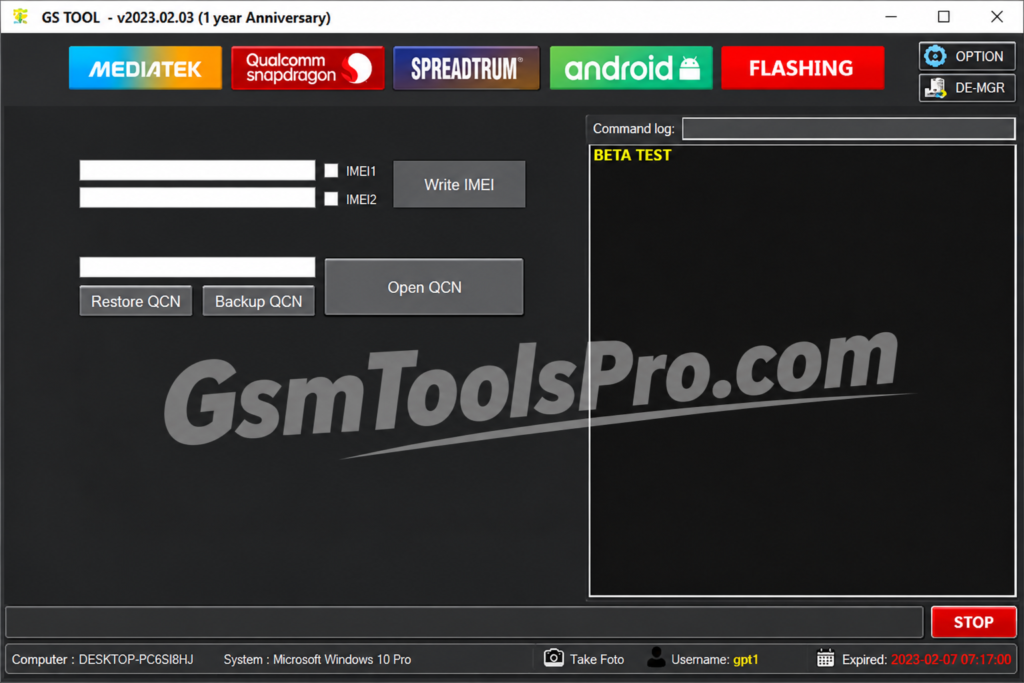
GS Tool is a Windows-based Android repair software that supports MediaTek, Qualcomm, and SPD chipsets. The tool helps GSM technicians perform FRP removal, factory reset, bootloader unlock, IMEI repair, EFS reset, and demo mode removal. Furthermore, with its simple interface and multiple servicing functions, GS Tool provides a single platform for Android unlocking, device maintenance, flashing, and software troubleshooting.
Key Features oF GS Tool 2027
FRP Remove
The tool provides an FRP removal option and unlocks the device safely without losing the firmware and demanding the mobile when the owner forgets the Google verification password.
Bootloader Unlock & Lock
Easily unlock or relock the bootloader on Android devices. It helps in firmware repair and related operations.
IMEI Repair
The tool allows you to repair the IMEI when the device is stuck due to an IMEI damage issue, making repair easy with one software.
EFS Reset
Solve SIM-related problems using the EFS Reset option, making the network damage fully reset and working as before.
Demo Mode Removal
On Android devices, remove demo mode to use the device smoothly and fully functional.
Multi-Brand Support
The GS Tool supports multi-brand support, including Xiaomi, Samsung, Vivo, OPPO, and Realme. It also works with MediaTek, Qualcomm, and SPD devices.
Download Information
| Component | Details |
|---|---|
| Tool Name | GS Tool |
| Version | v2023.02.03 |
| File Size | 94.04 MB |
| File Type | Windows Utility |
| Platform | Windows PC |
System Requirements
| Component | System Requirements |
|---|---|
| Operating System | Windows 7, 8, 10, 11 (32-bit & 64-bit) |
| Processor | Intel Dual-Core or equivalent |
| RAM | 2 GB Minimum |
| Free Storage | 200 MB |
| USB Connection | Required |
| USB Drivers | Android USB Drivers |
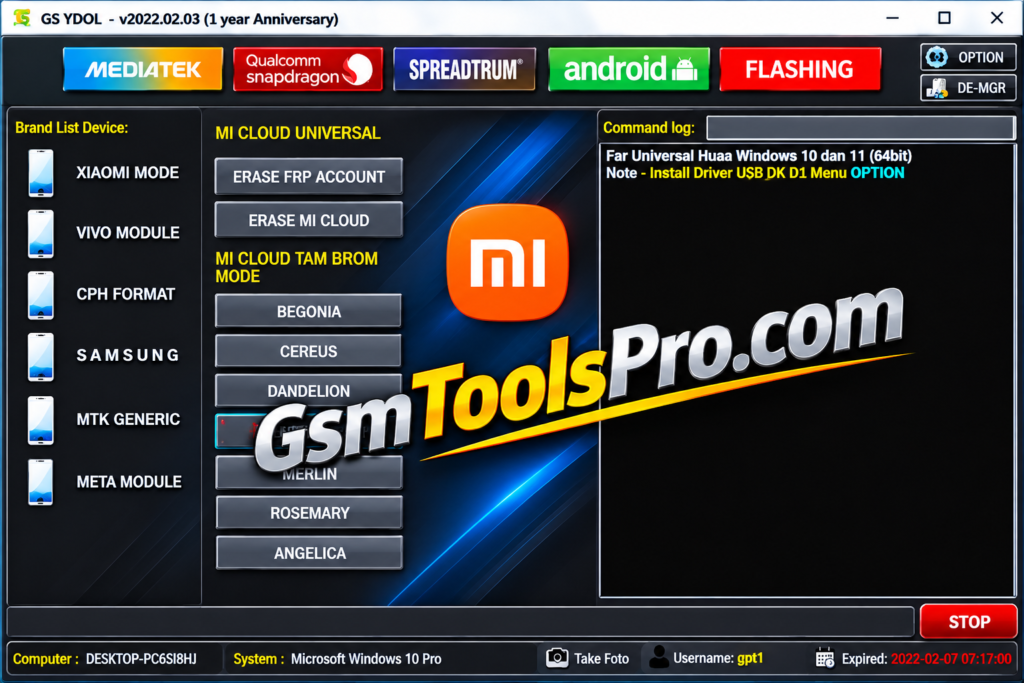
How to Download, Install & Use GS Tool v2023.02.03?
- Download The Tool: Visit a trusted download source and download the GS Tool v2023.02.03 setup file to your Windows computer.
- Extract the Files: Once the download finishes, locate the ZIP or compressed folder. Right-click it and select Extract All to access the setup files.
- Install USB Drivers: Install the required Android USB drivers so your computer can detect and communicate with the connected smartphone.
- Run GS Tool: Open the extracted folder and launch the GS Tool application. If required, run it as an administrator.
- Connect Your Device: Use a suitable USB cable to connect your Android phone to the computer. Select the correct connection mode if the software requests it.
- Choose a Service Function: Open the available options and select the required operation, such as Factory Reset, FRP Removal, EFS Reset, or Bootloader Management.
- Complete the Process: Follow the on-screen instructions and wait for the selected operation to finish. Keep the USB connection stable until the software displays its completion message.
Pros and Cons
| Pros | Cons |
|---|---|
| Supports MediaTek, Qualcomm, and SPD chipsets. | Supports only selected device models. |
| Offers multiple Android repair functions in one tool. | Some functions may not work on newer security patches. |
| Includes FRP removal for supported Samsung, Xiaomi, Vivo, and OPPO devices. | Requires compatible USB drivers and proper device connections. |
| Provides factory reset and EFS reset options. | Incorrect operations may erase important user data. |
| Supports bootloader lock and unlock functions. | The interface and version are relatively old. |
| Includes ADB, Fastboot, and EDL-related operations. | Some advanced functions may require authentication or login access. |
Also Read: DARS Unlock Tool v5 | Download Latest Version for FRP Unlock and Flashing
Conclusion
GS Tool offers essential Android servicing functions in one Windows application. It helps mobile technicians perform FRP removal, factory reset, IMEI repair, EFS reset, bootloader management, and firmware flashing on mobiles. It supports MediaTek, Qualcomm, and SPD chipsets and covers several Android repair tasks. Its simple interface makes device maintenance easier, but always check model compatibility before starting any operation.
FAQ’s
Does the Tool support MediaTek, Qualcomm, and SPD devices?
Yes, GS Tool supports all three chipset families, but available functions depend on the phone model and supported security level.
Can GS Tool remove FRP from Samsung phones?
Yes, it includes Samsung FRP functions through ADB and Test Mode for supported Samsung models.
Can I use GS Tool to remove Xiaomi Mi Cloud?
Yes, GS Tool includes Mi Cloud removal options for selected Xiaomi devices through supported service modes.
Does GS setup support Vivo and OPPO demo removal?
Yes, it offers demo removal functions for selected Vivo and OPPO models. Some functions are marked as beta.
Does GS software require an internet connection?
Some versions provide login-based access. The published version description also mentions 10 free logins, so access requirements may depend on the service.
Why is my Android phone not detected by GS.exe?
Check your USB cable, install the correct Android USB drivers, enable the required connection mode, and make sure your device model is supported.