IMEI Write Tool R21.18.3901 Setup Download for Windows [Activated Versions]
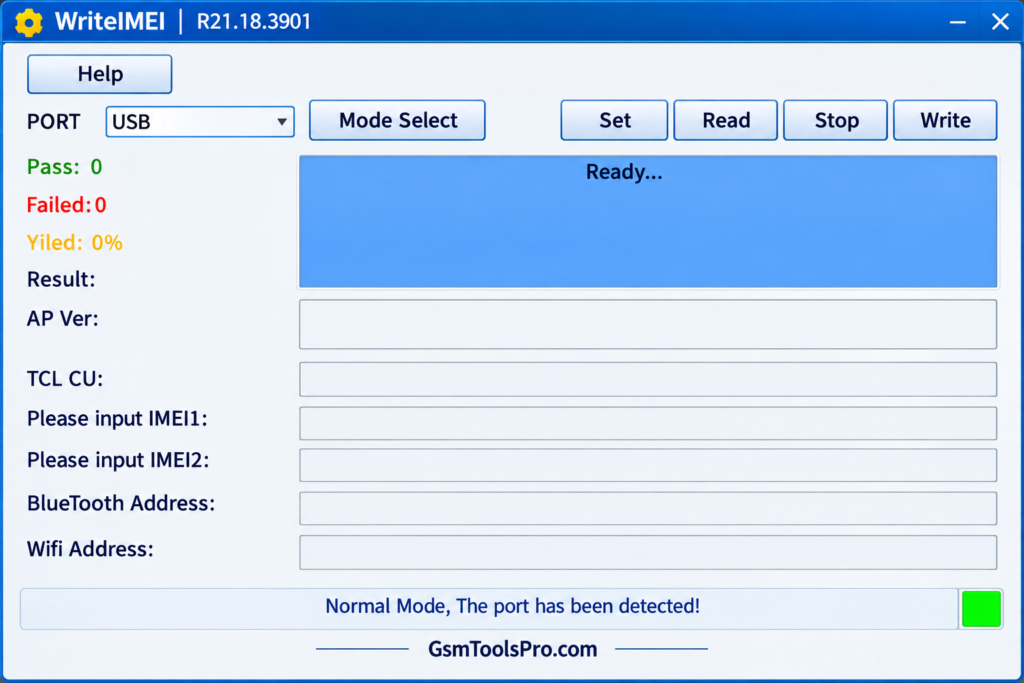
Missing IMEI data can create network problems after Android software repair. IMEI Write Tool R21.18.3901 helps technicians restore original IMEI information on Spreadtrum, Unisoc, and compatible MTK devices, and also manage Bluetooth Address, Wi-Fi Address, Serial Number (SN), and multiple SIM entries through Normal or Calibration Mode.
Also Read: Hunter Tool V4.6.5 Download Free 2026 [Working Setup]
Download Drivers: All Drivers
What is the IMEI Write Tool?
IMEI Write Tool is a Windows tool for Android phones. It helps technicians restore or repair device identity data when corrupted after software issues. The tool supports IMEI, Bluetooth address, Wi-Fi address, and serial number operations. Its beginner-friendly interface is useful for Spreadtrum/Unisoc devices during device servicing.
Key Features Of Write IMEI Tool 2026
IMEI writing
IMEI Writing allows technicians to write or restore the original IMEI on Spreadtrum and Unisoc smartphones, feature phones, and tablets. This function is useful when the original IMEI becomes corrupted or missing after firmware flashing or software repair.
Flash multiple IMEI
The Flash Multiple IMEI feature allows dual-SIM or multi-SIM Spreadtrum and Unisoc devices to receive their required IMEI entries in one operation. Users can enter multiple IMEI values, select the writing mode, and start the process through the tool.
Dual connection modes
The tool provides Normal Mode and Calibration Mode for connecting Spreadtrum and Unisoc devices. Normal Mode requires the phone to be powered on, and Calibration Mode supports a USB connection for device servicing.
Custom IMEI support
Custom IMEI Support allows technicians to enter a specific IMEI value for devices when performing repairs or restorations. The action may be illegal in some countries; check for permission before use.
Compatibility
WriteIMEI Tool is designed for devices using Spreadtrum (SPD) and Unisoc chipsets. Compatibility depends on the device and chipset version. Some sources mention MediaTek (MTK) support, but this should be verified for the tool version and device before use.
Read IMEI
The Read IMEI feature displays the IMEI number stored on a device. It helps technicians check the device identity before repair or restoration. For dual-SIM phones, the tool may show multiple IMEI entries for the device.
Restore IMEI
Restore IMEI helps return a device to its original IMEI after the number has been accidentally erased or corrupted during software servicing.
What’s New in the Latest Version?
- Full Hardware ID Writing
- Simultaneous Multi-SIM Support
- Dual Connection Modes
IMEI Write Tool File Information
| Information | Details |
| Tool Name | Write IMEI Tool |
| Version | R21.18.3901 |
| File Format | ZIP |
| Application File | WriteIMEI.exe |
| Platform | Windows |
| Tool Type | Portable |
| Installation | Not Required |
| Main Support | Spreadtrum (SPD) / Unisoc |
| Primary Use | IMEI Writing & Restoration |
| Driver Required | SPD / Unisoc USB Driver |
How to Download the Write IMEI Tool
- Download the WriteIMEI Tool R21.18.3901 ZIP file from a trusted source.
- Save the ZIP file on your Windows computer.
- Right-click the ZIP file and extract it using WinRAR or 7-Zip.
- Open the extracted folder.
- Run the WriteIMEI.exe file to start the portable tool.
How to Use the IMEI Write Tool
The tool is portable, so no installation is required.
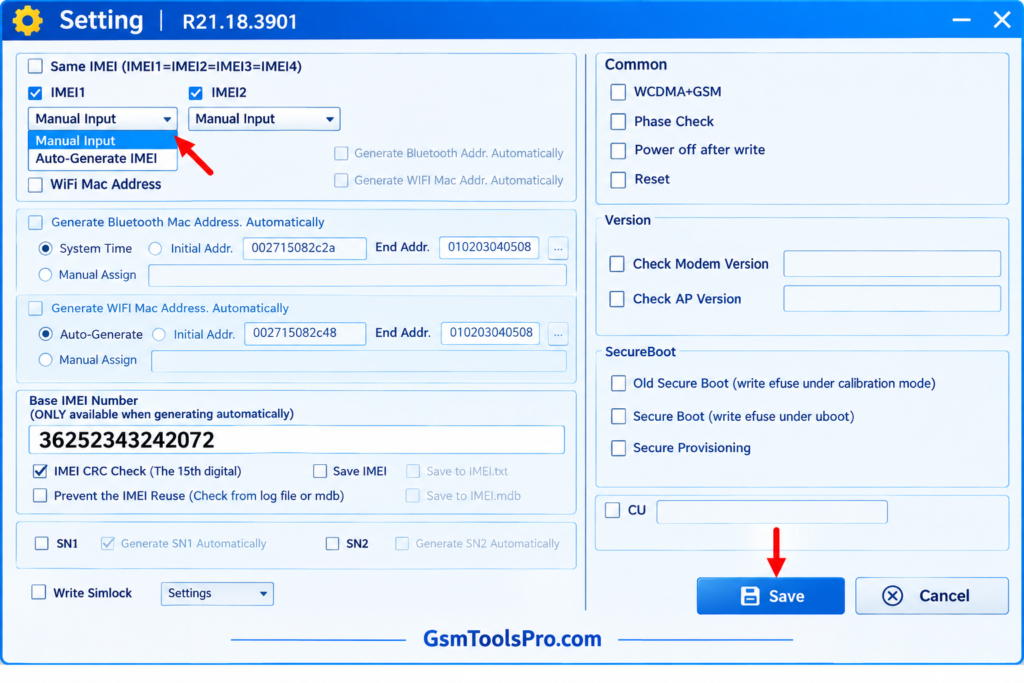
- Extract the Tool: Unzip the downloaded WriteIMEI Tool package on your Windows PC.
- Install Drivers: Install the correct SPD/Unisoc USB Driver for device detection.
- Connect Device: Put the supported device in Diag Mode and connect it using a USB cable.
- Open Tool: Run WriteIMEI.exe.
- Select Port: Choose the detected COM port from the Port menu.
- Select Mode: Choose Normal Mode or Calibration Mode.
- Enter IMEI: Enter the device’s original IMEI in the IMEI field.
- Write IMEI: Click Write and wait for the process to finish.
- Restart Device: Reboot the phone and verify the IMEI using *#06#.
Advantages & Limitations of IMEI Write Tool
Advantages
- Free to use: Available without paid activation or subscription.
- Portable: Runs directly without a lengthy installation process.
- Multiple IMEI Support: Can write multiple IMEI values on supported multi-SIM devices.
- IMEI Reading & Restore: Some versions can read and restore the original IMEI.
- Dual Modes: Supports Normal and Calibration modes.
- Lightweight: Simple interface with basic servicing options.
Limitations
- Limited Chipset Support: Mainly designed for Spreadtrum (SPD) and Unisoc devices.
- Windows Only: Designed for Windows computers.
- Driver Required: Correct SPD/Unisoc USB drivers are needed for detection.
- Device Compatibility: Does not support every Android phone.
- Technical Setup: COM ports and connection modes may require technical knowledge.
Conclusion
IMEI Write Tool is Windows Software for Spreadtrum and Unisoc devices. It helps technicians restore IMEI data and manage Bluetooth, Wi-Fi, and serial number information. The tool supports single and multiple IMEI operations through different connection modes. Always use the original factory-assigned IMEI and follow local laws when repairing device identity information.
FAQ’s
What is the Write IMEI Tool used for?
WriteIMEI Tool is used to write or restore the original IMEI information on supported Spreadtrum and Unisoc devices.
Why does my phone show Invalid IMEI or Null IMEI?
This problem can occur when IMEI-related device data becomes corrupted or erased after firmware flashing, software updates, or incorrect servicing.
Does Write IMEI Tool support all Android phones?
No. WriteIMEI Tool is mainly designed for supported devices with Spreadtrum or Unisoc chipsets.
Is Write IMEI Tool R21.18.3901 free?
Yes, WriteIMEI Tool R21.18.3901 is generally available as a free Windows application for compatible devices.
Which connection modes are available in WriteIMEI Tool?
WriteIMEI Tool provides Normal Mode and Calibration Mode for connecting supported devices during servicing.
Can WriteIMEI Tool write multiple IMEI numbers?
Yes. Supported dual-SIM and multi-SIM devices can have their required IMEI entries written during the servicing process.
Is it legal to change an IMEI number?
Laws vary by country. Repairing a device using its original factory-assigned IMEI may be permitted, while changing it to a false or unauthorized number can be illegal.