
Chigo Unlocker Tool V3.5 for Qualcomm, MediaTek & SpreadTrum
When FRP locks, failed firmware, or software issues stop an Android phone from working, switching between repair tools can be frustrating. Chigo Unlocker Tool brings Qualcomm, MediaTek, and UNISOC/Spreadtrum servicing into one Windows tool, with EDL, Fastboot, FRP reset, firmware flashing, etc for Xiaomi, OPPO, Realme, Samsung, and Vivo devices.
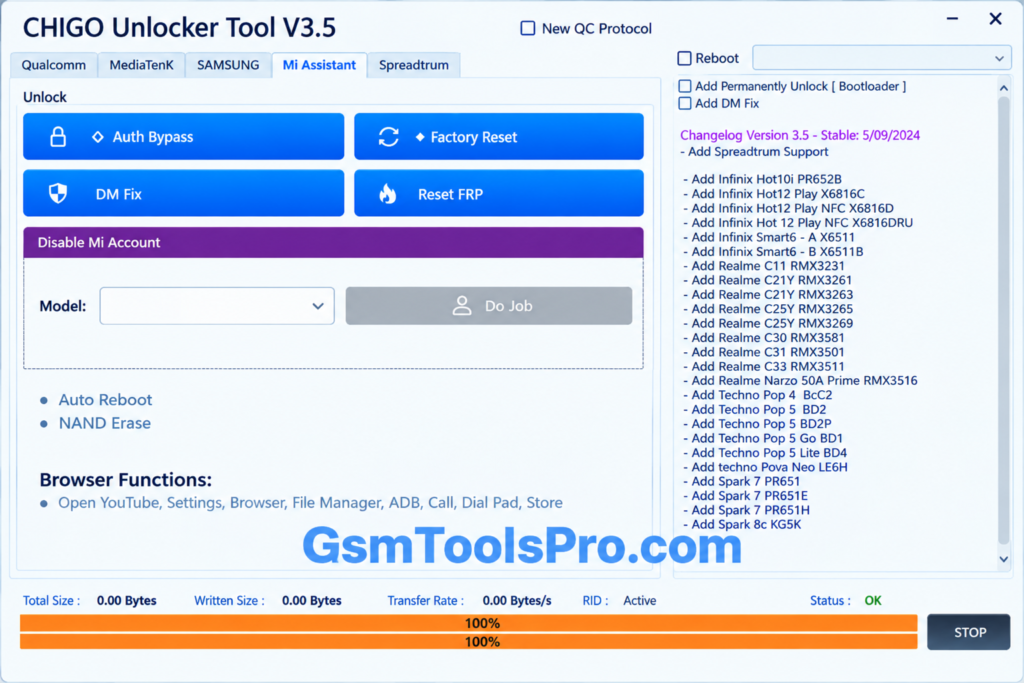
What is Chigo Unlocker Tool?
Chigo Unlocker Tool is a Windows-based Android repair tool for mobile technicians. The tool supports Qualcomm EDL, Fastboot, MediaTek, and UNISOC/Spreadtrum devices. The tool can solve FRP reset, user lock removal, factory reset, partition management, firmware flashing, and bootloader tasks. It also supports brands such as Xiaomi, OPPO, Realme, Samsung, and Vivo, making it the best phone repair software in one interface.
Key Features of Chigo Unlocker Tool
Qualcomm EDL Flashing
Repair and customize existing firmware to make the device fully functional. Technicians can perform tasks like Erase FRP, Clean Userdata, Backup, Read GPT, and Erase on supported Qualcomm devices.
FRP Reset
Reset FRP-locked devices after a factory reset easily with Chigo Tool . Availability may vary depending on the device model and Android version.
User Lock Removal
The Tool can help you unlock locked or forgotten passwords like patterns, PINs, etc
Fastboot Flash
The Fastboot flashing feature allows you to perform operations including flashing firmware, rebooting the system, and rebooting into EDL mode.
Xiaomi EDL Unlock
The tool provides operations for Xiaomi devices, including Factory Reset, FRP/EFS reset, and Mi Cloud management.
OPPO & Realme Support
The Chigo Unlocker Tool supports operation options for OPPO & Realme devices, including Factory Reset and EFS reset operations through the tool.
Samsung & Vivo Support
The tool provides FRP/EFS reset, data reset, information reading, and Safe Format operations for supported Samsung & Vivo models.
Network Repair
The Network Repair section supports Diag Mode, QCN, and NV items on andriod devices. Technicians can read or write network data to help fix Qualcomm device network issues.
MediaTek Functions
The MediaTek option supports flashing, erasing, backup, partition management, and Preloader Unlock for supported devices.
Universal BROM Unlock
Universal BROM provides Auth Bypass, Bootloader Unlock, Relock, DM Fix, and UserLock Removal options.
Samsung Flashing
The Samsung Flashing section supports MD5 firmware files with Auto Reboot and NAND Erase options.
Browser & Security Functions
It provides quick access to YouTube, Settings, Browser, File Manager, ADB, Call, Dial Pad, and Store functions.
Mi Assistant
Mi Assistant provides useful servicing options for supported Xiaomi devices through Recovery Mode.
What’s New in Chigo Unlocker Tool?
- 725 Qualcomm AutoLoader Programmers for easier device connection.
- New QC Protocol for improved Qualcomm device communication.
- UFS GPT Parser for reading UFS partition information.
- Auto Storage Detection to detect device storage automatically.
- USB Transfer Optimization for faster data transfer.
- Automatic XML Commands during supported flashing operations.
- Custom Preloader EMI support for MediaTek devices.
Download Information
| Detail | Information |
| Tool Name | Chigo Unlocker Tool |
| Version | v3.5 |
| Platform | Windows |
| File Size | 23.7 MB* |
| File Format | ZIP |
| Password | None* |
| Main Support | Qualcomm, MediaTek, Spreadtrum/UNISOC |
| Release | v3.5 Stable – September 2024 |
Chigo Unlocker Tool System Requirements
| Requirement | Minimum / Recommended Details |
| Operating System | Windows 10/11 |
| Processor | Intel or AMD processor |
| RAM | 4 GB recommended |
| Storage | At least 100 MB free space |
| USB Drivers | Qualcomm, MediaTek & Spreadtrum/UNISOC drivers |
| USB Port | Working USB 2.0/3.0 port |
| USB Cable | Good-quality USB data cable |
| Permissions | Administrator privileges |
| Supported Devices | Qualcomm, MediaTek & Spreadtrum/UNISOC phones |
How to Download & Use the Chigo Unlocker Tool
- Download the Chigo Unlocker Tool from a trusted source.
- Find the downloaded ZIP or setup file on your PC.
- Extract the ZIP file to an easy location, such as the C:\ drive.
- Open the extracted folder and locate the Chigo Tool executable.
- Run the setup and complete the installation by following the screen instructions.
- If activation is required, use the valid license or activation details for your copy.
- Launch Chigo Unlocker Tool from the desktop or installation folder.
- Allow Administrator permissions if Windows asks for access.
- Connect the supported Android phone and choose the required servicing function.
- Check the correct USB drivers and device mode before starting any flashing, reset, or repair task.
Pros & Cons
| Pros | Cons |
| Supports Qualcomm, MediaTek, and Spreadtrum/UNISOC chipsets. | Some features may not work on every device model. |
| Combines EDL, Fastboot, and MediaTek servicing in one tool. | Advanced functions need technical knowledge. |
| Includes firmware flashing, backup, and partition management. | Wrong flashing can cause software or boot problems. |
| Provides QCN and NV options for supported network repair tasks. | Results can vary by device model and firmware version. |
| Supports Samsung, Xiaomi, OPPO, Realme, and Vivo devices. | Some operations require EDL, BROM, or Fastboot mode. |
Also Read: TTA EDL Tool V1.0.4 Latest Version Download [2026]
Conclusion
Chigo Unlocker Tool puts many Android servicing tasks in one Windows tool. It supports Qualcomm, MediaTek, and Spreadtrum/UNISOC devices for flashing, resetting, unlocking, etc. functions. The tool supports Xiaomi, OPPO, Realme, Samsung, and Vivo, it can be useful for technicians who handle different phones and need one tool for common software repair tasks.
FAQ’s
What devices does Chigo Unlocker Tool support?
Chigo Unlocker Tool supports selected Qualcomm, MediaTek, and Spreadtrum/UNISOC devices from brands like Xiaomi, OPPO, Realme, Samsung, and Vivo.
Can Chigo Unlocker Tool flash Qualcomm devices?
Yes. It provides Qualcomm EDL Flash and Fastboot Flash options for supported devices and firmware.
Does Chigo Unlocker Tool support MediaTek phones?
Yes. Its MediaTek section includes flashing, backup, erase, partition management, and Preloader Unlock functions.
Can Chigo Unlocker Tool reset FRP?
Yes. The tool includes FRP reset options for supported devices, with different functions available through Qualcomm, MediaTek, Samsung, and Xiaomi sections.
Does Chigo Unlocker Tool support Samsung flashing?
Yes. It supports Samsung MD5 firmware flashing, along with options such as Auto Reboot and NAND Erase.
![DRT Tool Activated Setup Download [2026]](https://gsmtoolspro.com/wp-content/uploads/2026/09/DRT-Tool-Activated-Setup-Download-2026-2-768x576.png "DRT Tool Activated Setup Download [2026] 3")