Easy Multi Tool v1.2.0 Download Setup [100% working]
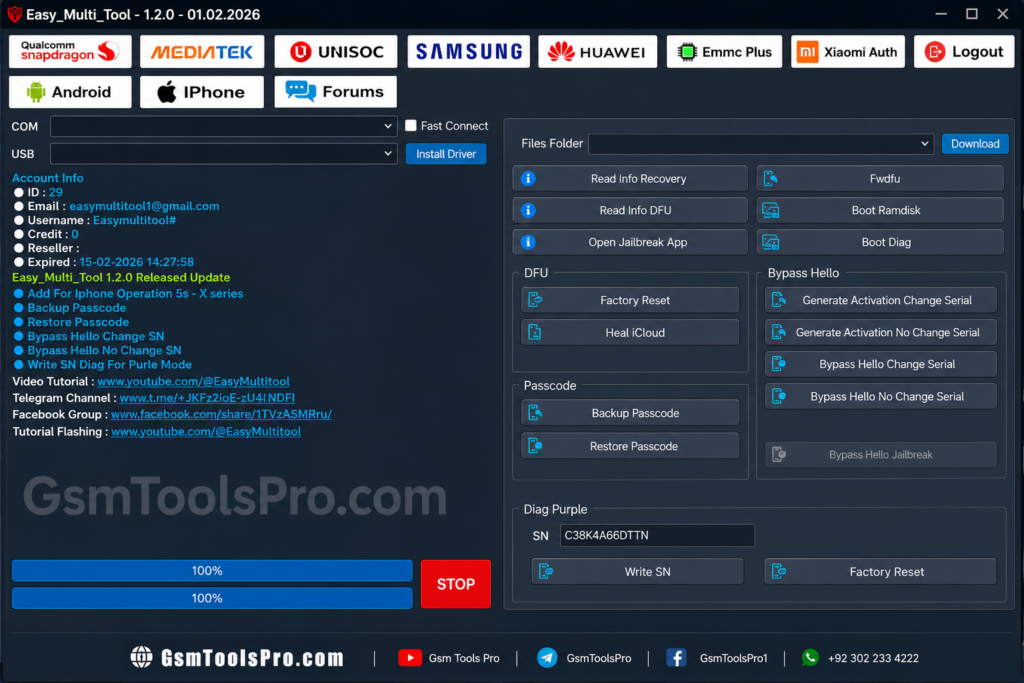
Android phones can face FRP locks, boot loops, firmware errors, and software restrictions that make servicing difficult. Easy Multi Tool v1.2.0 brings Qualcomm, MediaTek, and Unisoc support into one Windows platform, with FRP removal, firmware flashing, factory reset, multi-brand servicing, etc for compatible devices.
What is Easy Multi Tool v1.2.0?
Easy Multi Tool v1.2.0 is a Windows and Android servicing tool made for mobile technicians. It offers device repair, FRP reset, firmware flashing, bootloader, and unlocking functions in one interface. The software works with Qualcomm Snapdragon, MediaTek (MTK), and Unisoc (SPD) devices, making smartphone servicing more reliable from one PC.
Easy Multi v1.2.0 Key Features Latest
MediaTek (MTK) module
MediaTek (MTK) module supports Auth/SLA bypass, firmware flashing, FRP removal, factory reset, bootloader unlock, IMEI writing, and Meta Mode operations. It also handles RPMB, EFS, certificate repair, plus Red State, Orange State, and DM-Verity issues on devices.
Factory Reset
Factory Reset allows technicians to restore Android devices by clearing user data and returning the software to a clean state. The MTK module also offers Universal Factory Reset and Safe Format, depending on the device and servicing requirements.
FRP Removal
FRP Removal helps technicians Factory Reset Protection (FRP) on Android devices after a reset. Easy Multi Tool supports FRP servicing across various Qualcomm, MediaTek (MTK), and Unisoc platforms, depending on device and software compatibility.
Firmware Flashing
Firmware Flashing allows technicians to install or repair software on Android devices. Easy Multi software helps reinstall firmware, fix boot loops, and update device software across Qualcomm, MediaTek (MTK), and Unisoc platforms.
MDM & KG Unlock
MDM & KG Unlock helps technicians handle Mobile Device Management (MDM) restrictions and Samsung Knox Guard (KG) locks. Easy Multi Tool offers servicing options for corporate managed, retail, and finance locked Android devices.
Multi-Brand Support
Easy Multi Tools supports multiple Android brands, including Samsung, Xiaomi, Redmi, Oppo, Realme, Vivo, Tecno, Infinix, Itel, Nokia, Asus, Symphony, and Walton, giving technicians broader device coverage.
What’s New in Easy Multi?
Recent Easy Multi Tool updates focus on Android 15/16 support, improved FRP and factory reset services, updated DA/Preloader files, Unisoc (SPD) profiles, and server-based services. Newer versions may also add device models, chipset support, flashing stability, device detection, connection handling, database updates, interface improvements, and bug fixes.
How to Download, Install & Use Easy Multi Tool?
- Download the latest version of Easy Multi Tool from a trusted source.
- Extract the ZIP/RAR package with WinRAR or 7-Zip.
- Install the required Android USB and chipset drivers.
- Run the setup as Administrator.
- Launch the installed Easy Multi Tool.
- Connect the supported Android device via USB.
- Select the required MTK, Qualcomm, or Unisoc module.
- Choose FRP, Factory Reset, or Firmware Flashing.
- Verify device compatibility before starting the process.
- Complete the operation and restart the device.
System requirements & file information
| File Information | Details |
| Tool Name | Easy Multi Tool |
| File Name | EasyMultiTool_V1.2.0.rar |
| Version | v1.2.0 |
| File Size | 69.89 MB |
| Supported OS | Windows 7/8/10/11 |
| Architecture | 64-bit Recommended |
| RAM | 4 GB Minimum |
| Storage | 200 MB Free Space |
| Drivers | Android USB Drivers |
| Internet | Required for Some Services |
Also Read: TFM Tool Pro v3.4.1 Latest Version 2026 [100% working]
Conclusion
Easy Multi Tool v1.2.0 offers Android servicing functions in one Windows application. It supports multiple chipsets, Qualcomm, MediaTek, and Unisoc, so the technicians can handle issues like FRP removal, IMEI repair, bootloader operations, etc. Its multi-brand support makes it a useful option for smartphone repair.
FAQ’s
What Qualcomm functions are available in Easy Multi Tool?
The Qualcomm Snapdragon module offers flashing, partition management, FRP, EFS, bootloader, IMEI, and other servicing options for supported phones.
Can the tool manage Android partitions?
Yes. Its Partition Manager provides options to read, erase, write, and manage compatible device partitions.
Can Easy Multi Tool work through ADB and Fastboot?
Yes. ADB and Fastboot connections are supported for several Android servicing operations, depending on the device.
Does it support Huawei ID servicing?
Yes. Supported Huawei devices can use the Huawei module for Huawei ID reset and related servicing functions.
Can it flash Unisoc firmware?
Yes. The Unisoc (SPD) module supports PAC flashing, along with factory reset, FRP, partition, and NV functions.
Can it flash Samsung firmware using Odin?
Yes. The built-in Odin Flasher supports Samsung BL, AP, CP, CSC, and MD5 firmware packages.


![TTA EDL Tool V1.0.4 Latest Version Download [2026]](https://gsmtoolspro.com/wp-content/uploads/2026/09/TTA-EDL-Tool-V1.0.4-Latest-Version-Download-2026-2-768x576.png "TTA EDL Tool V1.0.4 Latest Version Download [2026] 6")