Octoplus Samsung Tool v.5.1.5 Free Download [2026]
Facing FRP, firmware, or lock issues on Samsung Galaxy devices? Octoplus Samsung Tool v5.1.6 brings Exynos, Qualcomm, MediaTek, and Spreadtrum servicing into one Windows utility. It supports FRP, EFS, MDM, IMEI, CSC, EUB, and firmware tasks, with newer support for Galaxy S24–S26 and Z Fold/Flip models.
What Is Octoplus Samsung Tool?
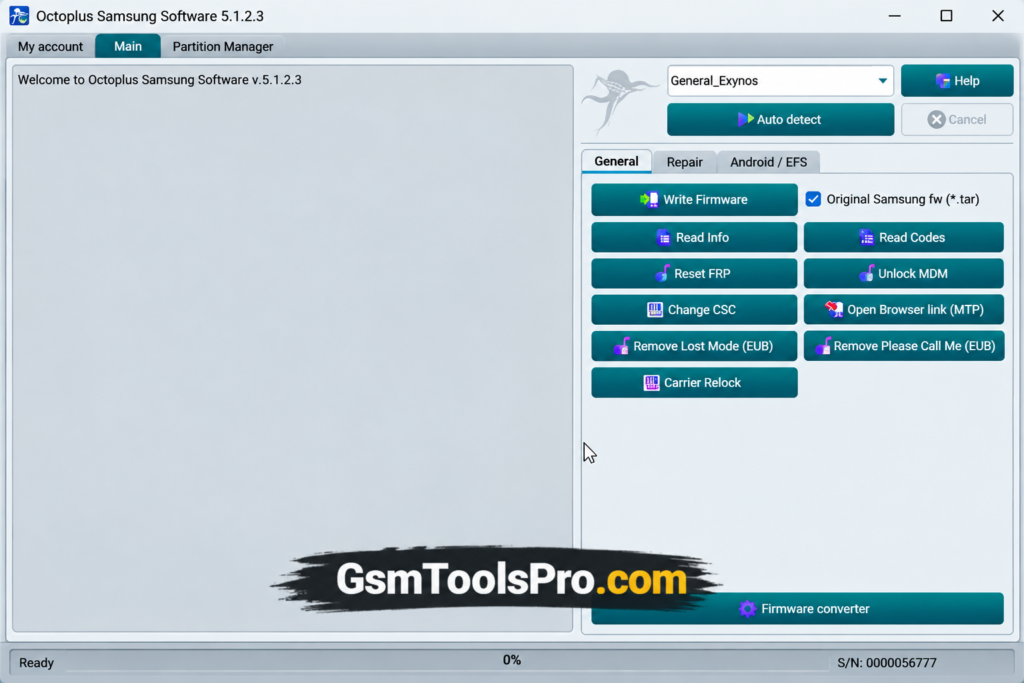
Octoplus Samsung Tool is a Windows Samsung repair Tool for Galaxy devices. It supports Exynos, Qualcomm, MediaTek, and Spreadtrum platforms and solves issues including FRP reset, screen-lock reset, firmware flashing, EFS & MDM operations, IMEI repair, CSC configuration, and device information. Newer versions also add EUB mode, Qualcomm loaders, Lost Mode removal, and improved Read Codes for supported Samsung models.
Key Features of Octoplus Samsung Tool
Exynos
Octoplus Samsung Tool supports Exynos Samsung devices for firmware, FRP, CSC, MDM, EUB, and lock-related operations.
MediaTek
It supports MediaTek Samsung devices for firmware, FRP, MDM, CSC, code reading, and device repair.
Qualcomm
The tool Supports Qualcomm Samsung devices for firmware, FRP, MDM, CSC, network unlock, Lost Mode, and code reading.
Spreadtrum
Supports Spreadtrum Samsung devices for firmware, FRP, MDM, CSC, code reading, and MTP operations.
Repair Functions
The software Provides IMEI repair, network repair, IMEI A/B, and other supported repair options for Samsung devices.
Android / EFS Functions
Samsung Tool includes EFS data, security, Download Mode, Recovery Mode, factory reset, and ADB operations.
EUB Mode
Offers EUB servicing on Samsung devices, including selected Exynos 9610 and 9611 models.
What’s New in Octoplus Samsung Tool?
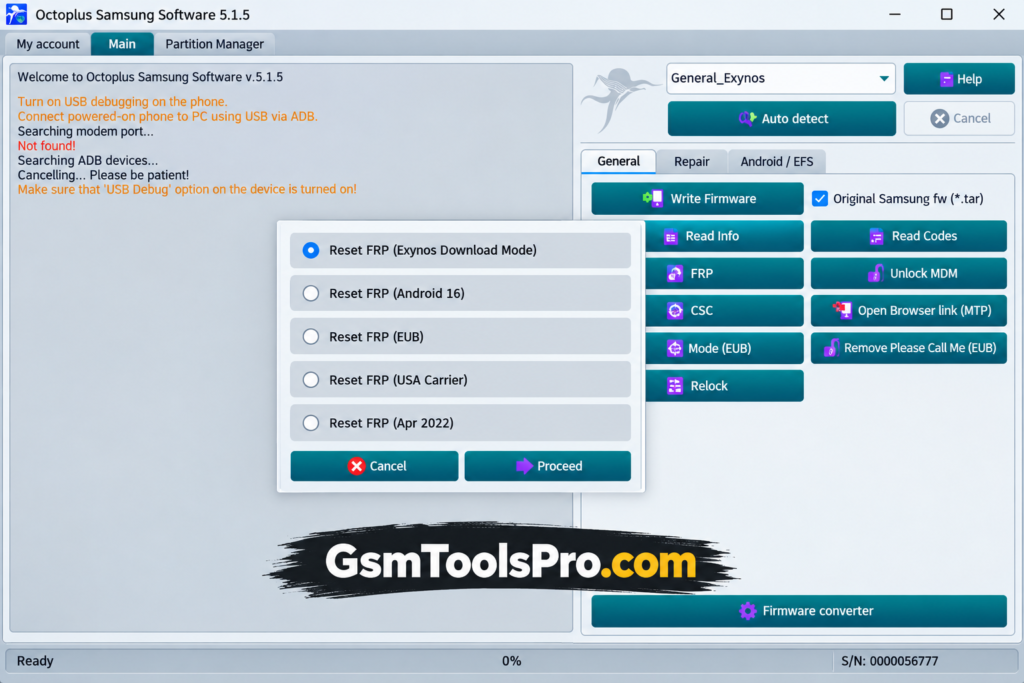
The latest Octoplus Samsung Tool v5.1.5, released on August 26, 2026, expands Reset FRP support for US carrier Samsung models. Addition of new models S24, S25, S26, Z Fold 6/7, and Z Flip 6/7.
- Extended Reset FRP support for US models
- Support for newer Samsung security patches
- Added Galaxy S24, S25, and S26 US variants
- Added Galaxy Z Fold 6/7 support
- Added Galaxy Z Flip 6/7 support
- Previous v5.1.5 also expanded Exynos FRP support.
Download Information
| Information | Details |
| Tool Name | Octoplus Samsung Tool |
| Latest Version | v5.1.5 |
| Installer Name | Octoplus Samsung Installer |
| File Size | 388.04 MB |
| Release Date | August 26, 2026 |
| Platform | Windows |
| Developer | Octoplus Team |
| Official Download | Available from Octoplus Software Downloads |
System Requirements Octoplus Samsung Tool
| Requirement | Details |
| Operating System | Windows |
| RAM | 4 GB recommended |
| Storage | At least 1 GB free space |
| USB Drivers | Samsung USB / ADB / Qualcomm / MTK / Spreadtrum, as required |
| Internet | Required for activation and online functions |
| USB Port | Required for connecting Samsung devices |
How to Download & Install the Octoplus Samsung Tool?
- Get the Octoplus Samsung Tool setup from a reliable source.
- Unzip the package if it comes as a compressed file.
- Find the setup file and run it as administrator.
- Follow the steps displayed by the installation wizard.
- Install the required Samsung USB drivers and other drivers.
- Complete the installation and wait until all files are copied.
- Restart your Windows computer if prompted.
- Launch Octoplus Samsung Tool after the restart.
- Connect your compatible Samsung phone with a proper USB cable.
- Choose the required device or chipset section and start the needed servicing operation.
Pros & Cons
| Pros | Cons |
| Supports multiple Samsung chipsets, including Exynos and Qualcomm. | Support varies by Samsung model, firmware, and security version. |
| Offers firmware, FRP, MDM, EFS, IMEI, and other servicing functions. | Some features require an active license, activation, or credits. |
| Regular updates add support for newer devices and security patches. | Advanced operations may require technical knowledge and the correct connection mode. |
| Provides dedicated tools and loaders for supported Samsung devices. | Not every feature works on every supported Samsung device. |
Also Read: HTH ND Android Tool V1.0.0 Free Activated Version For Windows
Conclusion
Octoplus Samsung Tool brings Samsung servicing tasks into one Windows. It supports selected Exynos, Qualcomm, MediaTek, and Spreadtrum devices for FRP, firmware, EFS, MDM, IMEI, CSC, and network-related operations. Regular updates expand device and security support, making it useful for mobile technicians handling different Samsung Galaxy models.
FAQs
Can Octoplus Samsung Tool reset FRP on Samsung phones?
Yes, FRP Reset is available for supported Samsung models, but support depends on the model, chipset, and security patch.
Does Octoplus Samsung Tool support Exynos devices?
Yes. Recent versions added EUB support for selected Exynos processors, including Exynos 7884, 7904, 9610, and 9611.
Why does EUB connection fail on some Samsung phones?
EUB operations depend on the exact model, security level, and connection method. Test-point or Download Mode setup may also be required.
Can Octoplus Samsung Tool remove MDM?
It supports MDM-related servicing on selected Samsung devices, but the available operation depends on the model and software version.
Does Octoplus Samsung Tool support the latest Samsung security?
Support is updated regularly, but it is not universal. Users commonly check the exact model and security level before starting an operation.
Is Octoplus Samsung Tool available with yearly activation?
Yes. Since v5.0.0, certain older activations require annual renewal after the applicable activation period.
![MRT Tool v6.1 Full Activated Setup Download [2026] (2)](https://gsmtoolspro.com/wp-content/uploads/2026/09/MRT-Tool-v6.1-Full-Activated-Setup-Download-2026-2-768x576.png "MRT Tool v6.1 Full Activated Setup Download [2026] 5")
![SSC Defeat Tool by Sengkoyo Service Center Mobile Unlocking [100% Working]](https://gsmtoolspro.com/wp-content/uploads/2026/09/SSC-Defeat-Tool-by-Sengkoyo-Service-Center-Mobile-Unlocking-100-Working-768x576.png "SSC Defeat Tool by Sengkoyo Service Center Mobile Unlocking [100% Working] 6")