
HTH ND Android Tool V1.0.0 Free Activated Version For Windows
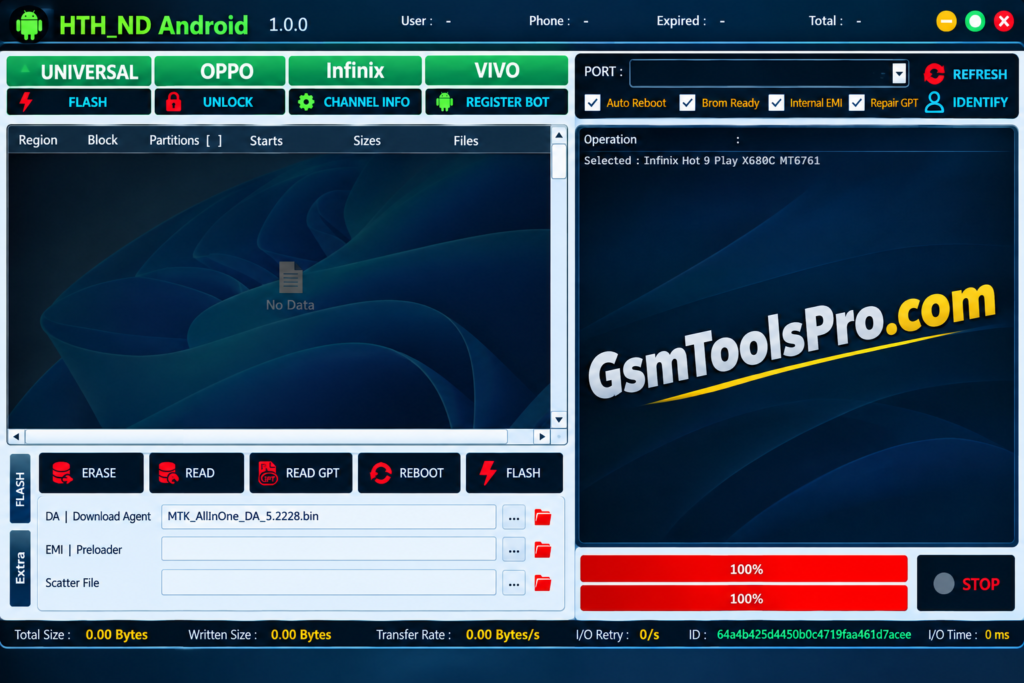
Are you facing FRP locks, data errors, or servicing issues on MediaTek phones? HTH ND Android Tool V1.0.0 provides BROM and Preloader operations for supported Oppo, Vivo, and Infinix devices, with FRP, Format Data, bootloader, and device-info functions in one lightweight Windows setup.
What is the HTH ND Android Tool?
HTH ND Android Tool is an Android servicing software for MediaTek smartphones, including Oppo, Vivo, and Infinix. It works through BROM and Preloader modes for tasks such as FRP Erase, Data Erase, Format Data, Read Device Info, and Bootloader Unlock/Relock. It also includes EMI Preloader, IMEI Dump/Write, and MiCloud management options for Android technicians.
Key Features Of HTH ND Android Tool
BROM Support
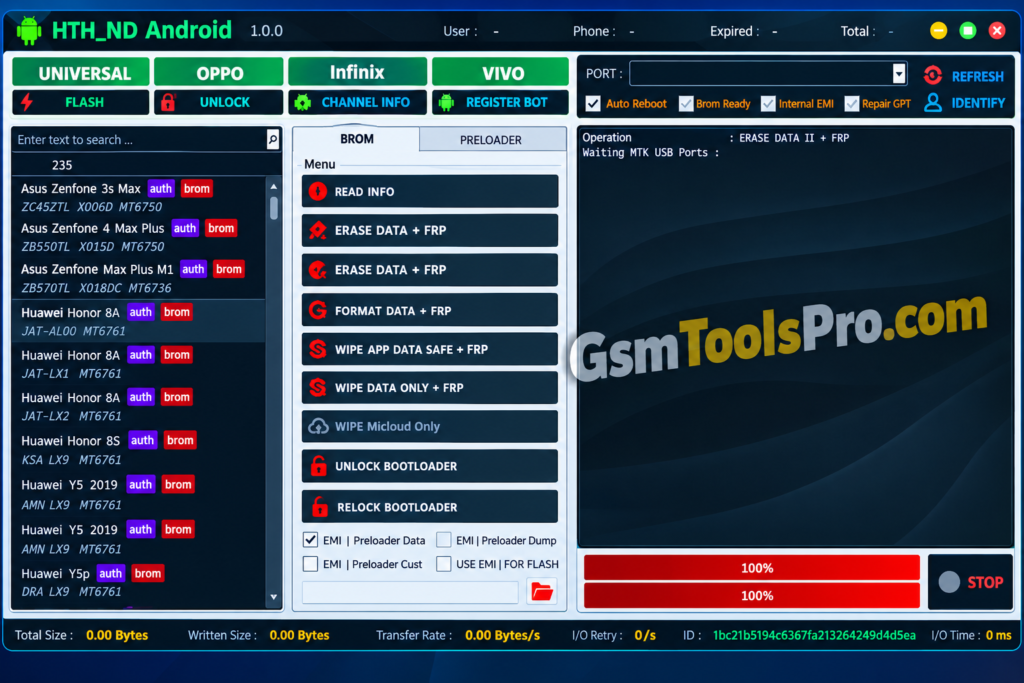
HTH ND Android Tool supports MediaTek BROM mode for reading info, erasing data, FRP operations, MiCloud wiping, and bootloader control.
EMI Preloader Support
Provides EMI Preloader Data, Dump, and Cust functions, with an option to use EMI files during flashing operations.
Preloader Mode Support
Supports Preloader mode on MTK smartphones for reading device info, FRP operations, data formatting, and bootloader unlock or relock.
FRP Removal
Remove FRP lock after factory reset. It restores the data without losing it during the operation.
Format Data
The Tool Allows to format, removing user data and settings to help resolve certain software-related issues on MediaTek devices.
Read Device Info
It shows the connected device info and makes it easy to decide the write operation for the device.
MiCloud Management
The HTH ND provides a dedicated MiCloud erase option for handling MiCloud-related data during Android servicing.
Vivo IMEI Write
It supports IMEI writing on selected Vivo devices for authorized repair, maintenance, and device servicing requirements.
Download Information
| File Info | Details |
| Tool Name | HTH ND Android Tool |
| Version | V1.0.0 |
| Release Date | 16 March 2025 |
| Price | Free |
| File Format | RAR archive |
| Archive Password | 123 |
| Download Source | MediaFire / Google Drive / Mega |
System Requirements
| System Requirement | Details |
| Operating System | Windows XP, Vista, 7, 8, 8.1, 10 |
| System Type | 32-bit & 64-bit |
| Processor | No specific CPU requirement stated |
| RAM | No specific RAM requirement stated |
| Storage | Free space for tool and required drivers |
| USB Port | Required for connecting supported Android devices |
| USB Drivers | Compatible MediaTek drivers recommended |
How to Download, Install & Use HTH ND Android Tool V1.0.0?
- Download the HTH ND Android Tool V1.0.0 package from a reliable website.
- Extract the downloaded archive to an accessible folder on your PC.
- Install the required MediaTek USB drivers for proper device detection.
- Open the folder containing the extracted tool files.
- Right-click the tool and choose Run as Administrator.
- Connect your supported MediaTek phone in BROM or Preloader mode.
- Select Read Info to check whether the device is detected correctly.
- Choose the required servicing option, such as FRP erase, format, or bootloader operation.
- Verify the device model and selected operation before proceeding.
- Start the process and keep the USB connection stable.
- Allow the tool to complete the selected task without disconnecting the phone.
- Once finished, restart the device and check that the operation was completed successfully.
Pros & Cons
| Pros | Cons |
| Free to use | Mainly focused on MediaTek devices |
| Supports BROM and Preloader modes | Device compatibility can vary |
| Works with several Oppo, Vivo, and Infinix models | No detailed official hardware requirements |
| Lightweight servicing utility | Some operations require proper USB drivers |
| Supports multiple device maintenance tasks | Incorrect operations may cause data loss |
Also Read: SSC Defeat Tool by Sengkoyo Service Center Mobile Unlocking [100% Working]
Conclusion
HTH ND Android Tool V1.0.0 is a MediaTek servicing utility with BROM, Preloader, FRP, bootloader, MiCloud, and Vivo IMEI functions. It supports Oppo, Vivo, and Infinix models, while its compatibility varies by device and chipset. The tool is available as a free Windows setup, making it useful for Android repair and maintenance tasks.
FAQ’s
Which phones does HTH ND Android Tool support?
It mainly targets supported MediaTek phones, with listed models from Oppo, Vivo, and Infinix.
Does it work in BROM and Preloader modes?
Yes. The tool provides separate BROM and Preloader functions for compatible MediaTek devices.
Can it remove FRP on supported devices?
Yes. FRP erase options are available through supported BROM and Preloader operations.
Can HTH ND Android Tool unlock the bootloader?
Yes. It includes both Unlock Bootloader and Relock Bootloader options for supported devices.
Does the tool support Vivo IMEI writing?
Yes. A dedicated Write IMEI Vivo Only function is listed for selected Vivo devices.
What Windows versions can run the tool?
The available documentation lists Windows XP through Windows 10, with support for both 32-bit and 64-bit systems.
![MRT Tool v6.1 Full Activated Setup Download [2026] (2)](https://gsmtoolspro.com/wp-content/uploads/2026/09/MRT-Tool-v6.1-Full-Activated-Setup-Download-2026-2-768x576.png "MRT Tool v6.1 Full Activated Setup Download [2026] 3")
![Extra Tool V1.4.5 Free Setup 100% working [2026]](https://gsmtoolspro.com/wp-content/uploads/2026/09/Extra-Tool-V1.4.5-Download-Free-Setup-100-working-2026-3-768x576.png "Extra Tool V1.4.5 Download Free Setup 100% working [2026] 8")