
SamFw FRP Tool v6.0.1 Download Free Unlocked Version 2026
After a factory reset, a Google FRP lock can leave your Samsung phone stuck. SamFw FRP Tool gives technicians a simple Windows way to handle supported FRP, ADB, CSC, and device service tasks. Support depends on the model and security patch, so checking compatibility first can save time.
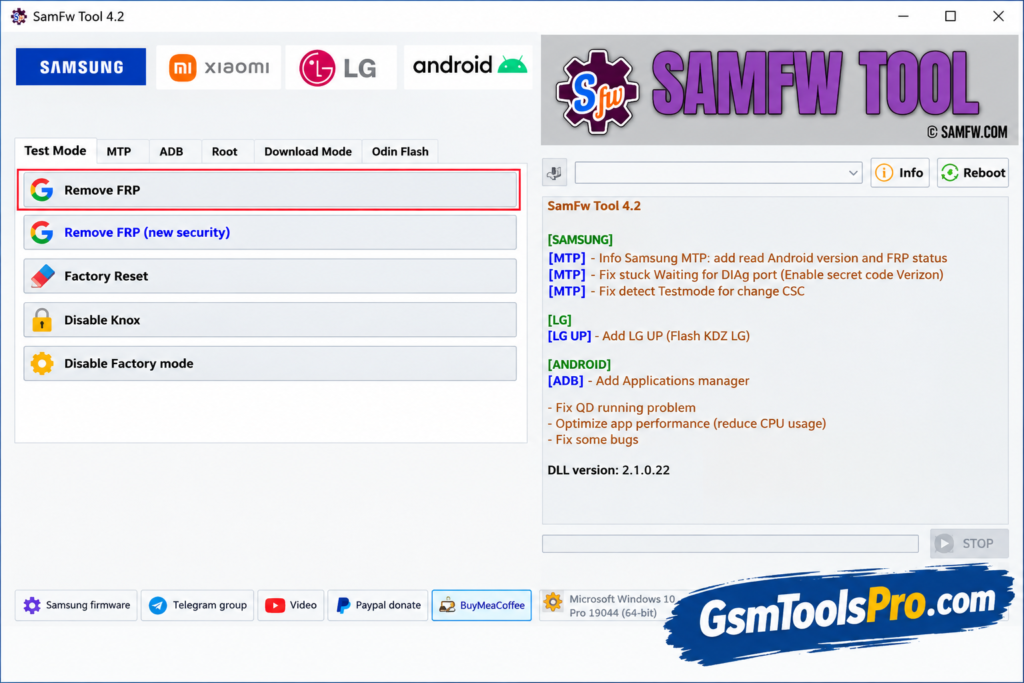
What is SamFw FRP Tool?
SamFw FRP Tool is a Windows software that helps to bypass FRP locks on Android devices. The tool provides an option to unlock FRP after a factory reset. Furthermore, the tool allows users to change the CSC and perform an Odin flash. It supports ADB mode to connect the device with computer and alow to perform operations, making it the best solution for daily FRP lock operations.
Key Features of SamFW Tool
FRP Bypass
SamFw FRP Tool helps handle Google FRP locks on Samsung devices after a factory reset.
Security Patch
It supports newer Samsung security patches, helping technicians work with updated firmware and Galaxy models.
ADB-Based Operations
Using ADB (Android Debug Bridge), the tool connects Android devices to Windows for servicing and maintenance tasks.
Additional Android Utilities
The tool includes useful Android utilities for device management, maintenance, and common servicing tasks through a simple workflow.
Device Detection
It can detect connected Android devices through supported modes, helping users identify phones before performing service operations.
Real-Time Logs
Live logs show ongoing operations and results, making it easier to track ADB commands and troubleshooting steps.
Enhanced User Interface
A simple Windows interface keeps common SamFw FRP Tool functions organized, allowing beginners and technicians to navigate tasks easily.
Change CSC
It changes the CSC through MTP or ADB methods for Android devices.
EDL 9008 Tools
The tool provides Qualcomm EDL 9008 partition management with read, write, erase, FRP reset, and factory reset functions.
Download Information
| Information | Details |
| Tool Name | SamFw Tool |
| Latest Version | v6.0.1 |
| Platform | Windows |
| File Format | ZIP |
SamFw FRP Tool System Requirements
| Requirement | Details |
| Operating System | Windows PC with compatible Windows versions |
| Processor | Dual-core processor or better recommended |
| RAM | 2 GB RAM or more recommended |
| Storage | At least 500 MB free space recommended |
| USB Port | USB port and a working data cable |
| Samsung USB Driver | Required for Samsung device detection and servicing |
| Visual C++ | Microsoft Visual C++ 2015 may be required for ADB functions |
| Internet | Internet connection required for some online/service functions |
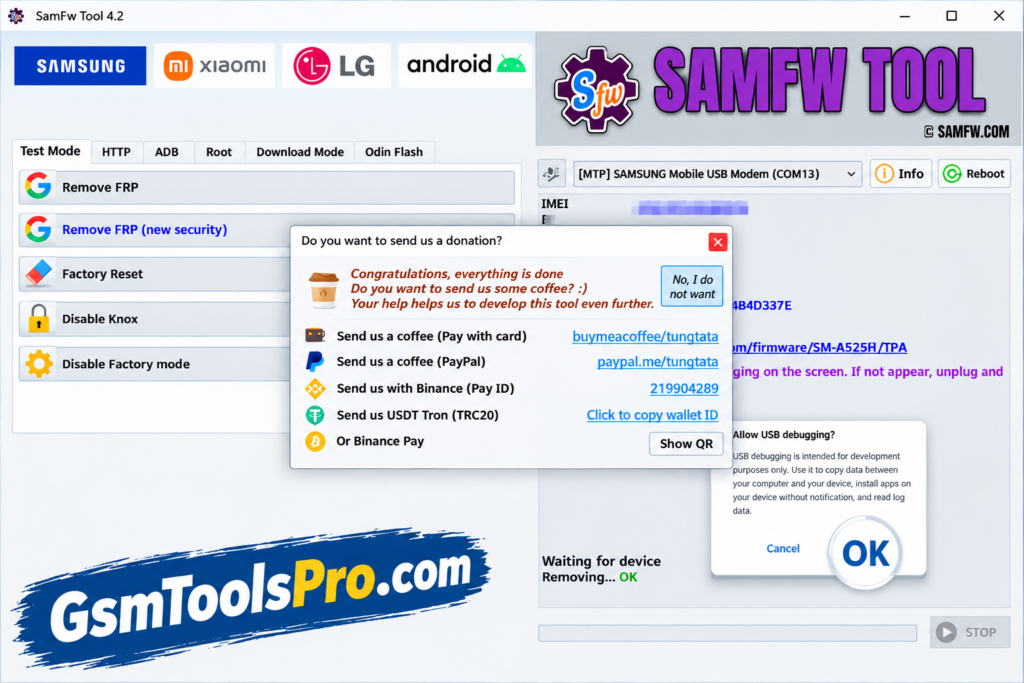
How To Download SamFw Tool?
- Download the SamFw Tool setup from the official SamFw website.
- Extract the downloaded ZIP file with 7-Zip or WinRAR.
- Open the extracted folder and run the SamFw Tool setup.
- Install the Samsung Android USB Driver if your PC does not already have it.
- Complete the installation and launch SamFw Tool with administrator privileges.
- Connect the supported Android phone using a reliable USB data cable.
- If USB Debugging authorization appears, allow the connection on the device.
- Let SamFw detect the phone, then select the required supported service from the tool.
Pros & Cons
| Pros | Cons |
| Supports Samsung FRP, CSC, factory reset, ADB, and Odin functions. | Some newer FRP services require paid credits. |
| Provides EDL 9008 support for selected Samsung and Qualcomm devices. | Device support varies by model, chipset, and security patch. |
| Includes Android utilities such as app management and bloatware removal. | Some advanced services depend on an online server. |
| Supports MediaTek operations including FRP and bootloader tasks. | Certain operations require specific drivers or connection modes. |
| Regular updates add support and fix compatibility issues. | Advanced repair functions may require technical knowledge. |
Also Read: MDM Fix Tool V1.1.0.1 Free Setup Download [2026]
Conclusion
SamFw FRP Tool is a simple Windows tool for Android repair. It helps with FRP, ADB, CSC, factory reset, and firmware problems. It is useful for Samsung devices, models, chipsets, and security patches. Furthermore, some services may require a Pro plan. Always use the tool on a phone you own or have permission to repair, and make a safety backup of the files before processing.
FAQ’s
Why is my phone not detected in SamFw Tool?
Check the Samsung USB drivers, USB cable, and connection mode. If the phone still does not appear, compatibility may depend on its model and Android version.
Why does SamFw FRP Tool fail on newer Samsung phones?
FRP methods can stop working on newer security patches. Users have reported different results depending on the Android version, model, and patch level.
Does SamFw Tool work with Android 13 or Android 14?
It can work on some devices, but there is no single method for every phone. The model, security patch, and available USB mode matter.
What should I do if SamFw shows “No Device Selected”?
First install the correct Samsung USB driver and reconnect the phone. Also check whether Windows detects the device before starting the SamFw operation.
Does SamFw Tool require a paid service for FRP?
Some FRP methods and online services may require payment, while other supported functions can be used without paid credits.
Why does FRP stay locked after using SamFw Tool?
A successful operation is not guaranteed on every device. Users report failures on certain models and with newer security patches, so checking the exact device version is important.
![EMC Activator v1.5.2 for iOS & iPad Download Latest Update Setup 2026 [100% Working]](https://gsmtoolspro.com/wp-content/uploads/2026/09/EMC-Activator-v1.5.2-for-iOS-iPad-Download-Latest-Update-Setup-2026-100-Working-768x512.png "EMC Activator v1.5.2 for iOS & iPad Download Latest Setup 2026 [100% Working] 3")


![Extra Tool V1.4.5 Free Setup 100% working [2026]](https://gsmtoolspro.com/wp-content/uploads/2026/09/Extra-Tool-V1.4.5-Download-Free-Setup-100-working-2026-3-768x576.png "Extra Tool V1.4.5 Download Free Setup 100% working [2026] 8")