RC DARK Tool v1.5.3 Download Latest Activated Setup [2027]
Is your Android phone difficult to service because you need multiple tools? RC Dark Tool v1.5.3 brings ADB, Fastboot, Samsung, Xiaomi, and Motorola servicing into one Windows interface. Read device information, manage apps, reboot phones, and access FRP and firmware functions from one place.
What is RC Dark Tool?
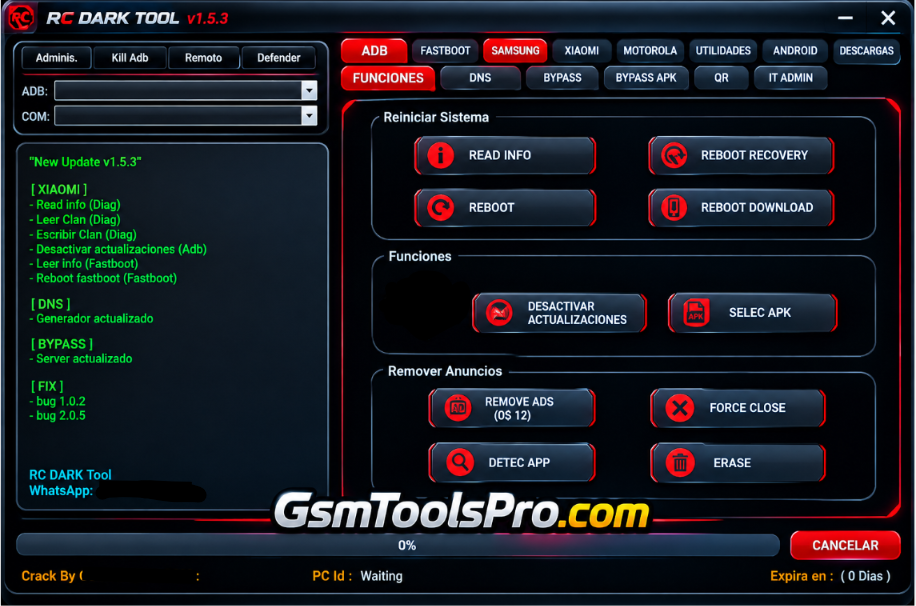
RC Dark Tool is a Windows-based Android repair software that helps mobile technicians manage and check smartphones from one interface. The tool supports ADB and Fastboot modes to connect and check device information, including model, Android version, build number, serial number, One UI, and security patch. This lightweight tool brings useful servicing functions into one application, making daily operations easier for technicians.
Key Features Of RC DARK Tool
Device Information
The tool allows you to read Android device details, including model, Android version, build number, serial number, One UI version, security patch, etc inforatmion.
ADB Functions
It uses ADB mode to connect the device to your PC to reboot Android phones into Recovery or Download Mode, install APK files, and perform basic servicing tasks.
Disable System Updates
It can Disable automatic OTA updates on Android devices to help prevent unwanted software updates and keep the current firmware version.
Magisk Installation
Install Magisk versions on compatible Android devices through the tool, simplifying the installation process for users who need root access.
Remove Ads
The RC Tool allows you to remove system advertisements from Android devices to reduce unwanted ads and provide a cleaner user interface.
Samsung Functions
You can access Samsung Galaxy devices using the RC Tool and read device information and Download Mode options to check phones and perform Samsung servicing tasks.
Xiaomi Functions
The RC Dark also manages Xiaomi devices through ADB and Fastboot, with options for rebooting, enabling DIAG mode, unlocking the bootloader, and backing up data.
What’s New in RC Dark Tool v1.5.3?
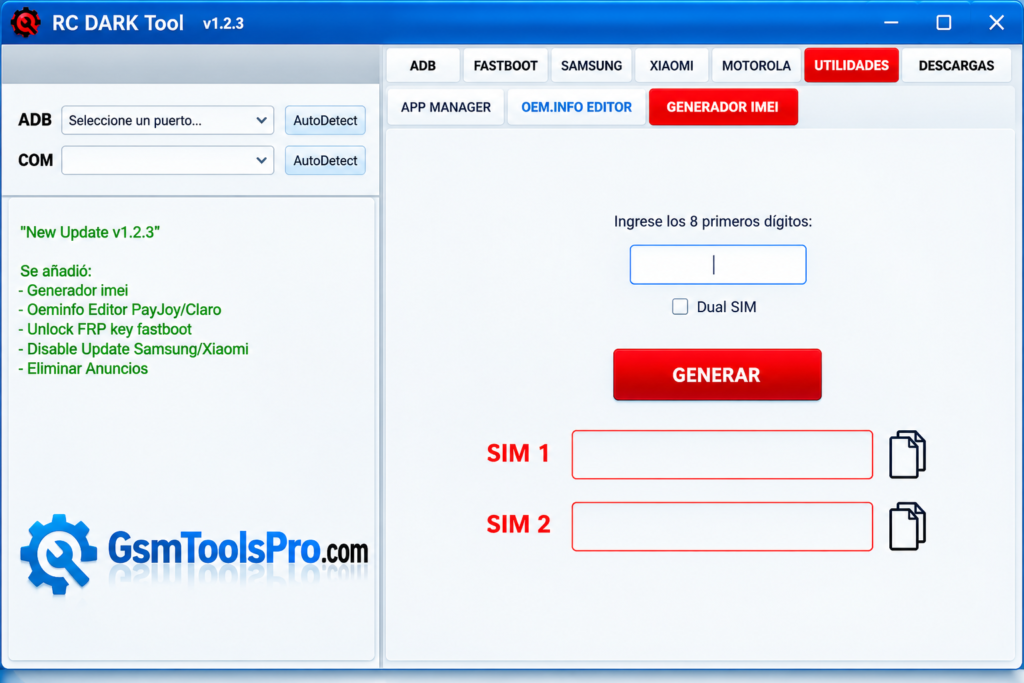
- IMEI Generator: Generate IMEI values with single-SIM and dual-SIM options for supported device testing.
- OEM Info Editor: Access PayJoy and Claro configuration options to manage supported OEM information during device servicing.
- Remove Ads: Use the Remove Ads function to remove supported system advertisements on compatible Android devices.
Download Information
| Details | Information |
|---|---|
| Tool Name | RC Dark Tool |
| Latest Version | v1.5.3 |
| File Name | RC Dark Tool v1.5.3 |
System Requirements
| Component | Requirement |
|---|---|
| Operating System | Windows 10 / 11 |
| Architecture | 64-bit recommended |
| RAM | 2 GB minimum (third-party estimate) |
| Processor | Not officially specified |
| Storage | Not officially specified |
| USB Connection | Required to connect Android devices |
| Drivers | ADB and Fastboot drivers for supported operations |
How To Download, Install & Use RC Dark Tool v1.5.3?
- Download RC Dark Tool from the trusted official website.
- Extract the downloaded archive with WinRAR or 7-Zip.
- Run the setup file and complete the installation on your Windows PC.
- Check your antivirus settings if they block the tool; avoid disabling protection unless necessary and safe.
- Connect your Android phone to the computer using a USB cable.
- Enable USB Debugging when required for ADB operations.
- Choose the needed function, such as FRP reset, IMEI servicing, or firmware flashing, if supported.
- Follow the tool’s on-screen instructions and wait for the operation to finish. Restart the device if prompted.
Pros and Cons
| Pros | Cons |
|---|---|
| Combines ADB, Fastboot, and Android servicing functions in one interface. | Works on Windows PCs; macOS and Linux support is not listed. |
| Reads device information, including model, Android version, and serial number. | Some operations require technical knowledge and correct device modes. |
| Supports selected Samsung, Xiaomi, and Motorola servicing functions. | Features may not work on every device or Android version. |
| Includes app management, reboot options, and firmware flashing tools. | Some functions may require root access or specific permissions. |
| Provides utilities such as IMEI generation and OEM information editing. | Unverified downloads may pose security risks or contain modified files. |
Also Read: SP MDT Tool v6.2316.00 Download Setup for Windows [2027]
Conclusion
RC Dark Tool is a Windows-based Android servicing tool that combines ADB, Fastboot, Samsung, Xiaomi, and Motorola functions in one interface. The tool helps technicians read device information, manage apps, reboot phones, and access FRP and firmware tools. Before using RC Dark Tool, check device compatibility, back up important data, and download the software from a trusted source.
FAQ’s
Does RC Dark Tool require login or activation?
Some listings describe versions that work without login, but activation requirements may differ by release and download source.
Why is my phone not detected by RC Dark Tool?
Check the USB cable, install the correct device drivers, and enable USB Debugging for ADB operations. Fastboot requires the phone to be in Fastboot mode.
Can RC Dark Tool work without USB Debugging?
Some Fastboot functions work in Fastboot mode without Android USB Debugging, while most ADB functions require USB Debugging and device authorization.
Does RC Dark Tool support Android 15?
Some v1.5.3 listings claim Android 15 support, but compatibility depends on the phone model, security patch, and specific operation.
Why does RC Dark Tool fail during servicing?
Common troubleshooting steps include checking drivers, USB connections, device mode, permissions, and compatibility. Back up important data before running repair operations.
Is RC Dark Tool safe to download and use?
Safety depends on the source and file integrity. Download only from a trusted source, scan the archive, and avoid unknown modified versions.