SSC Defeat Tool by Sengkoyo Service Center Mobile Unlocking [100% Working]
MediaTek phones can be difficult to service when BROM mode or device detection fails. SSC Defeat Tool by Sengkoyo Service Center gives technicians a simple Windows solution for supported MTK devices, with FRP, formatting, bootloader, NV/Baseband, and demo-mode servicing in one lightweight utility.
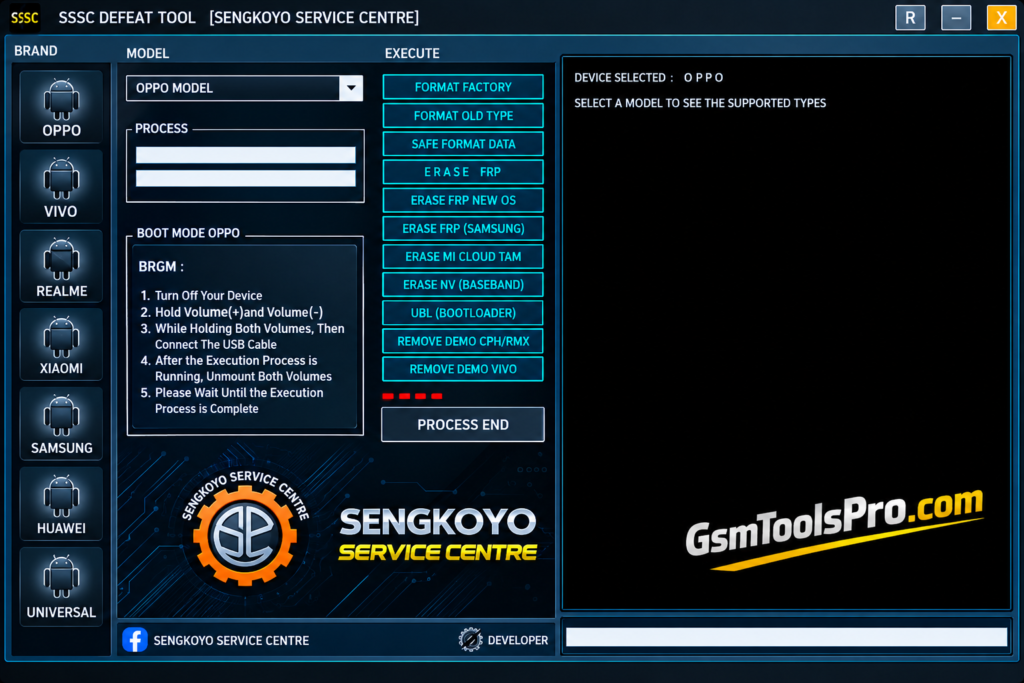
What is the SSC Defeat Tool?
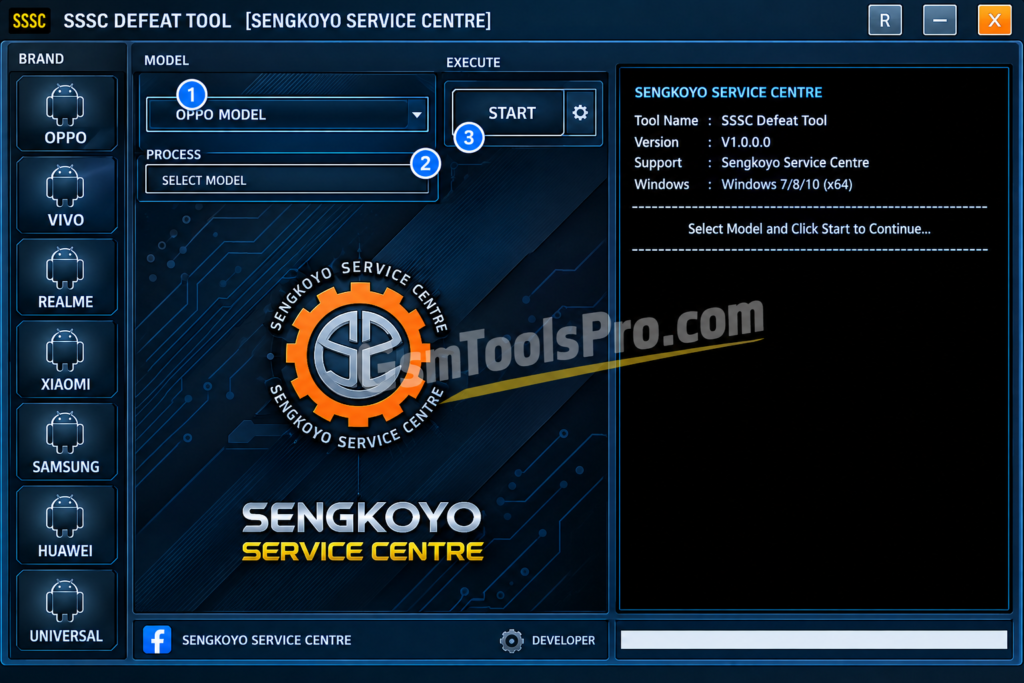
SSC Defeat Tool by Sengkoyo Service Center is a lightweight Windows software for mobile technicians working with MediaTek (MTK) smartphones through BROM/BootROM mode. It provides servicing options such as Format Factory, Format Old Type, FRP removal, Mi Cloud TAM, NV/Baseband erase, bootloader unlocking, and demo-mode removal for devices like Samsung, Oppo, Realme, and Vivo.
Key Features Of SSC Defeat Tool
Format Factory
It provides a standard format option to reset supported devices during mobile servicing and repair.
Format Old Type
The Tool can provide an old format option. It can be useful for those mobiles that need an old format for repair.
Remove Demo CPH/RMX
CPH and RMX models can be handled by this SSC tool, including devices from Oppo and Realme.
Safe Format Data
It helps technicians safely format device data during repair and easily choose the required formatting method.
Erase FRP
The tool helps to remove the FRP lock when you forget the password of your ID. It helps to unlock it safely without losing anything.
Erase MI Cloud TAM
It helps to clear NV or baseband-related information on Android devices to make the repair process easy and efficient
Unlock Bootloader
The SSC Tool helps to unlock the bootloader to prepare the device for the complete repair process.
Remove Demo Vivo
By using the tool, you can remove Demo Vivo devices that are running in demo mode. It helps to handle the demo mode-related issues.
What’s New in SSC Defeat Tool?
- Updated support for newer MTK devices
- Improved device detection process
- Better connection handling through BROM
- Cleaner and simpler workflow
- Portable Windows operation
- Support for selected smartphone models
- Faster access to servicing functions
- Better compatibility with updated drivers
- Technician-friendly working environment
- Lightweight tool with simple setup
Download Information
| Information | Details |
| Tool Name | SSC Defeat Tool |
| Version | v1.0.0 MTK24 |
| File Size | 24.4 MB |
| Developer | Sengkoyo Service Center |
| Platform | Windows |
| Processor Support | MediaTek |
| License | Free |
How to Download, Install & Use the SSC Defeat Tool?
- Get the SSC Defeat Tool package from a reliable source.
- Unpack the ZIP file on your Windows computer.
- Set up the necessary MediaTek USB drivers.
- Navigate to the extracted tool directory.
- Launch the tool as Administrator.
- Put the supported MTK phone into BROM mode.
- Connect the device to your PC with a USB cable.
- Check the detected device information.
- Choose the required servicing function.
- Review the selected operation before proceeding.
- Start the process and avoid disconnecting the USB cable.
- Allow the tool to complete the selected task.
- Disconnect and restart the phone once the process is finished.
Pros & Cons
| Pros | Cons |
| Supports MediaTek BROM servicing | Mainly focused on MediaTek devices |
| Lightweight Windows utility | Compatibility varies by device model |
| Offers several servicing options | Requires proper MTK drivers |
| Simple interface for technicians | Advanced operations need technical knowledge |
| Supports selected Oppo, Vivo, Samsung and other MTK models | Formatting can erase user data |
| Available as a free tool | Unofficial sources may carry security risks |
Also Read: SK Unlocker Tool V23 Free Activated Version 2026
Cocnlusion
SSC Defeat Tool is a simple Windows software for technicians working with MediaTek (MTK) phones. Its BROM/BootROM support, easy interface, and different servicing options make common repair tasks easier. It can also work with selected devices from brands like Samsung, Vivo, Oppo, and Realme. Before using it, always check device compatibility, install the correct drivers, and keep a stable USB connection.
FAQ’s
What devices does SSC Defeat Tool support?
SSC Defeat Tool mainly works with supported MediaTek phones, including selected Oppo, Vivo, Realme, Xiaomi, Samsung, and Huawei models.
Does SSC Defeat Tool work in BROM Mode?
Yes, the tool is designed for MediaTek BROM/BootROM mode and uses this connection method for supported servicing tasks.
Why is my MediaTek phone not detected?
Check the MediaTek USB drivers, USB cable, device power state, and BROM connection method before trying again.
Is SSC Defeat Tool free to use?
Current listings describe SSC Defeat Tool as a free Windows utility from Sengkoyo Service Center.
Does SSC Defeat Tool support Oppo and Realme phones?
Yes, selected Oppo CPH and Realme RMX models are listed, including demo-mode servicing options.
Can SSC Defeat Tool handle Samsung devices?
Yes, its listed functions include a dedicated Samsung FRP option, but support depends on the specific MediaTek model.
![Extra Tool V1.4.5 Free Setup 100% working [2026]](https://gsmtoolspro.com/wp-content/uploads/2026/09/Extra-Tool-V1.4.5-Download-Free-Setup-100-working-2026-3-768x576.png "Extra Tool V1.4.5 Download Free Setup 100% working [2026] 5")