Alriqi Soft Tools V2 Download For Unlocking & FRP [2026]
Are you facing Samsung or LG software servicing across different tools? Alriqi Soft Tools V2 puts FRP, ADB, CSC, Arabic keyboard, app management, network, and VoLTE functions in one Windows utility. Its support for selected Android versions and device models makes routine mobile servicing simpler, faster, and more organized for technicians.
What is Alriqi Soft Tools?
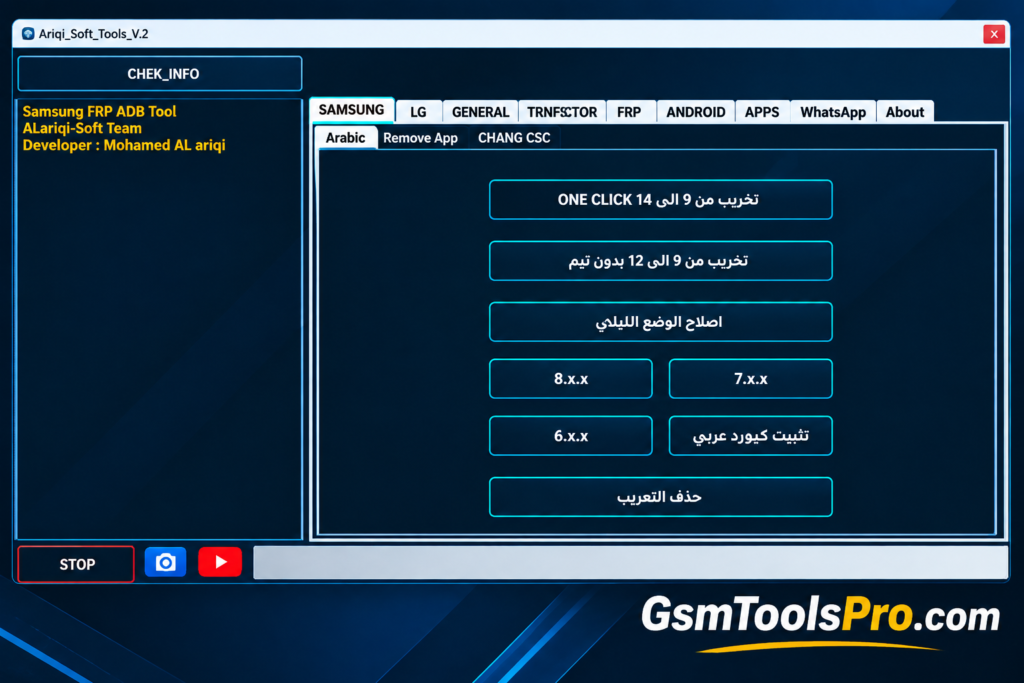
Alriqi Soft Tools is a Windows-based Android servicing tool for Samsung and LG smartphones. It combines FRP servicing, ADB commands, CSC settings, lock-screen operations, app management, Arabic keyboard installation, network utilities, VoLTE options, and diagnostics in one interface. Support can vary by device model, Android version, firmware, and security level, making it useful for routine mobile software servicing. Consequently making it is the best software for repairing.
Key Features Of Alriqi Soft Tools
Samsung FRP Servicing
The tool provides Samsung FRP servicing options for Galaxy devices, helping technicians handle Factory Reset Protection during Android software maintenance.
One-Click Samsung Operations
Offers one-click servicing functions for Samsung phones across Android 9, 10, 11, and 12, simplifying routine technician workflows.
Samsung Arabic & Localization
The software supports Arabic keyboard installation and selected language settings on Samsung devices, making Arabic input and regional device configuration easier.
LG ADB Support
It offers ADB-based functions for LG smartphones, including device communication, information access, commands, and software management operations.
Google Account Management
This feature includes ADB-based Google account management functions for compatible Android devices during servicing and software maintenance procedures.
App Management
The Alriqi Soft helps technicians view, remove, disable, or stop selected applications on Android smartphones, including carrier-related applications.
Lock Screen & Format
The Alriqi tool provides formatting and lock-screen servicing options for Android devices, helping technicians perform software maintenance and data-reset tasks.
CSC & SIM Settings
This includes Samsung CSC and SIM-related options for compatible models, with available functions depending on firmware, carrier, region, and device configuration.
Network & VoLTE Tools
The Alriqi Soft Tools offer network utilities, including APN, IMS, Diag Mode, and VoLTE options for Samsung and Android devices with configurations.
Download Information
| Information | Details |
| Tool Name | Alriqi Soft Tools |
| Version | V2 |
| File Size | 383.74 MB |
| File Format | ZIP |
| Platform | Windows |
| Main Support | Samsung & LG Android devices |
System Requirements
| Requirement | Minimum Requirement |
| Operating System | Windows 7, 8, 10, or 11 |
| Processor | Intel or AMD processor |
| RAM | 2 GB or more |
| Storage | At least 500 MB of free space |
| USB Port | Required for phone connection |
| Drivers | Compatible Samsung, LG, ADB, and USB drivers |
| Supported Devices | Samsung and LG Android smartphones |
How to Download, Install & Use Alriqi Soft Tools?
- Download Alriqi Soft Tools V2 from a reliable source or the provided download link.
- Extract the downloaded ZIP or RAR file using an archive utility.
- Install the required Samsung, LG, ADB, and USB drivers.
- Open the extracted Alriqi Soft Tools folder.
- Locate and run the main application or setup file.
- Start the tool with Administrator privileges.
- Connect the supported Android phone using a compatible USB cable.
- Select the relevant Samsung or LG servicing section.
- Choose the required function and follow the on-screen instructions carefully.
Pros & Cons
| Pros | Cons |
| Combines multiple Samsung and LG servicing functions in one tool. | Compatibility varies by device model, firmware, and Android version. |
| Includes Samsung FRP, ADB, CSC, and network-related options. | Some operations require the correct Samsung, LG, ADB, or USB drivers. |
| Provides Arabic keyboard and localization features for supported devices. | Advanced servicing functions may require technical knowledge. |
| Offers application management for supported Android phones. | Not every listed feature works on every supported Samsung or LG model. |
| Includes LG ADB and selected APN/network utilities. | Some formatting operations can erase user data. |
Also Read: Modem META Tool v10.2340.0.05 Free Mediatek IMEI Tool Download [2026]
Conclusion
Alriqi Soft Tools V2 brings Samsung and LG Android servicing features into one Windows interface. It supports FRP, ADB, CSC, Arabic keyboard, app management, network, VoLTE, and diagnostic functions on Android devices. Since features vary by model, firmware, Android version, and security level, check compatibility first and use the appropriate servicing option for your device. Before starting the servicing backup, backing up the device data to make the data safe is best practice.
FAQ’s
What is Alriqi Soft Tools V2 used for?
Alriqi Soft Tools V2 is a Windows Android servicing utility with Samsung and LG features for FRP, ADB, CSC, network, and device management.
Which devices are supported by Alriqi Soft Tools?
The tool mainly supports selected Samsung and LG Android devices. Available functions can vary depending on the model, firmware, Android version, and security level.
Does Alriqi Soft Tools support Samsung FRP servicing?
Yes, V2 includes Samsung FRP-related servicing options for compatible devices. The available operation depends on the phone model, Android version, and security configuration.
Can Alriqi Soft Tools work with LG phones?
Yes, it provides ADB-based functions for supported LG smartphones, including selected device-management, network, access-point, and software servicing options.
Does Alriqi Soft Tools support Arabic language and keyboard?
Yes, the tool includes Arabic keyboard and localization options for supported Samsung devices, helping technicians configure Arabic input and related language settings.
What drivers are needed for Alriqi Soft Tools V2?
Compatible Samsung, LG, ADB, and USB drivers may be required so Windows can properly detect and communicate with the connected Android device.
![Xiaomi Tool v2026.01.18 Use for Mi Account Setup Download [2026] (2)](https://gsmtoolspro.com/wp-content/uploads/2026/09/Xiaomi-Tool-v2026.01.18-Use-for-Mi-Account-Setup-Download-2026-2-768x576.png "Xiaomi Tool v2026.01.18 Use for Mi Account Setup Download [2026] 3")