Miracle Advanced Android Tool V1.35 Free Download Setup [2026]
Forgotten screen locks, FRP issues, or firmware problems can slow Android servicing. Miracle Advanced Android Tool V1.35 brings ADB, Fastboot, FRP, firmware flashing, IMEI repair, recovery, and backup/restore into one Windows toolkit, helping mobile technicians handle Android devices from a simple interface.
What is Miracle Advanced Android Tool?
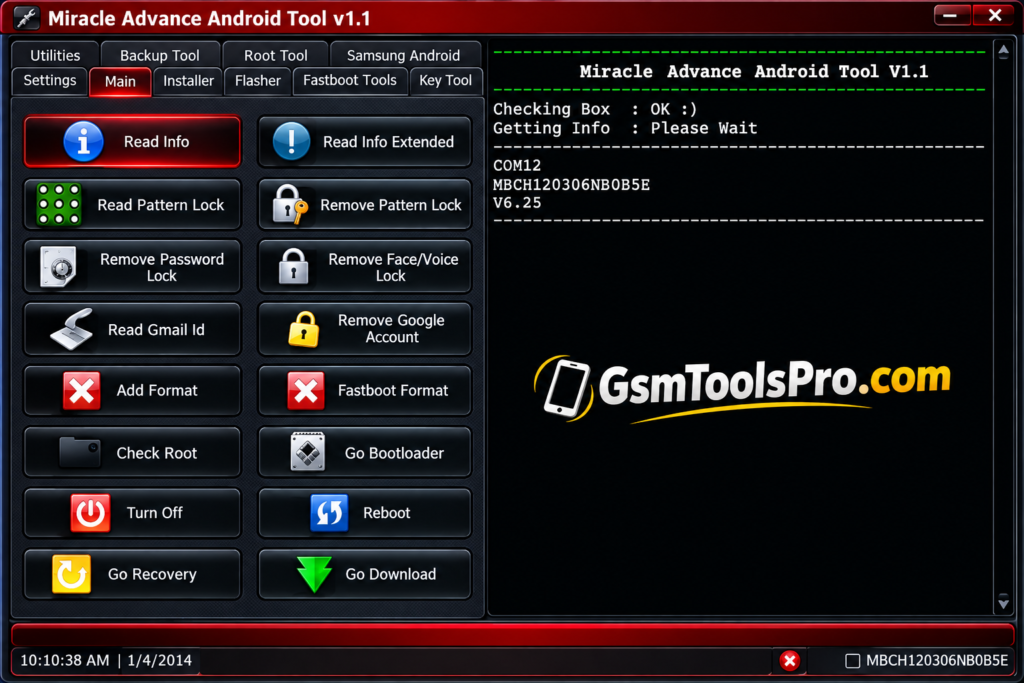
Miracle Advanced Android Tool is a Windows Android repair software for mobile technicians. It supports ADB and Fastboot for device management, diagnosis, and software repair. Depending on the supported device, it can read device information, handle FRP and Google account locks, check root status, work with recovery mode, flash firmware, and perform backup and restore tasks. Its simple interface keeps Android operations easy to perform.
Key Features Of Miracle Advanced Android Tool
Backup & Restore
The technician can easily back up and restore files before and after the repair so important remain safe. The tool offers a safe data backup and restore option that helps keep the data safe.
FRP Bypass
The tool helps to bypass FRP-locked mobiles that are stuck after the factory reset due to forgotten passwords of id by owners.
Screen Lock Removal
The Miracle Advanced software allows you to unlock mobile passwords that are forgotten, like passwords, patterns, PINs, etc without losing the mobile files.
Firmware Flashing
The software allows you to flash firmware and solve firmware-related issues.
Firmware Read & Write
The tool allows technicians to read and write firmware that is corrupted and showing issues, so technicians can easily read the issues using the advanced tool.
IMEI Repair
Restore or repair IMEI information on Android devices when network or identification issues occur.
Factory Reset
Reset supported Android phones to factory settings and remove existing user data when required.
Data Wipe
Clear personal files, settings, and stored data to prepare a device for fresh servicing.
Debugging Support
Use Android Debugging with devices to perform software checks, commands, and other repair operations.
Flash Recovery
Install recovery files to help technicians troubleshoot Android system and software-related problems.
Root Access
Access rooting functions for advanced Android maintenance, system changes, and technician-level servicing.
Virus Removal
Remove unwanted apps or potentially harmful files from Android devices during software maintenance.
Download Information
| Information | Details |
| Tool Name | Miracle Advanced Android Tool |
| Version | V1.35 |
| Platform | Windows |
| Tool Type | Android Servicing Tool |
| Developer/Team | Miracle Team |
| License | Free |
| Main Support | ADB, Fastboot, Android Servicing |
System Requirements
| Requirement | Minimum / Recommended |
| OS | Windows 7, 8, 8.1, 10, or 11 |
| Processor | Intel or AMD Processor |
| RAM | 2 GB or higher |
| Storage | 500 MB free space |
| USB Port | Required for device connection |
| USB Drivers | Android, ADB, and Fastboot Drivers |
| Internet | Recommended for downloads and updates |
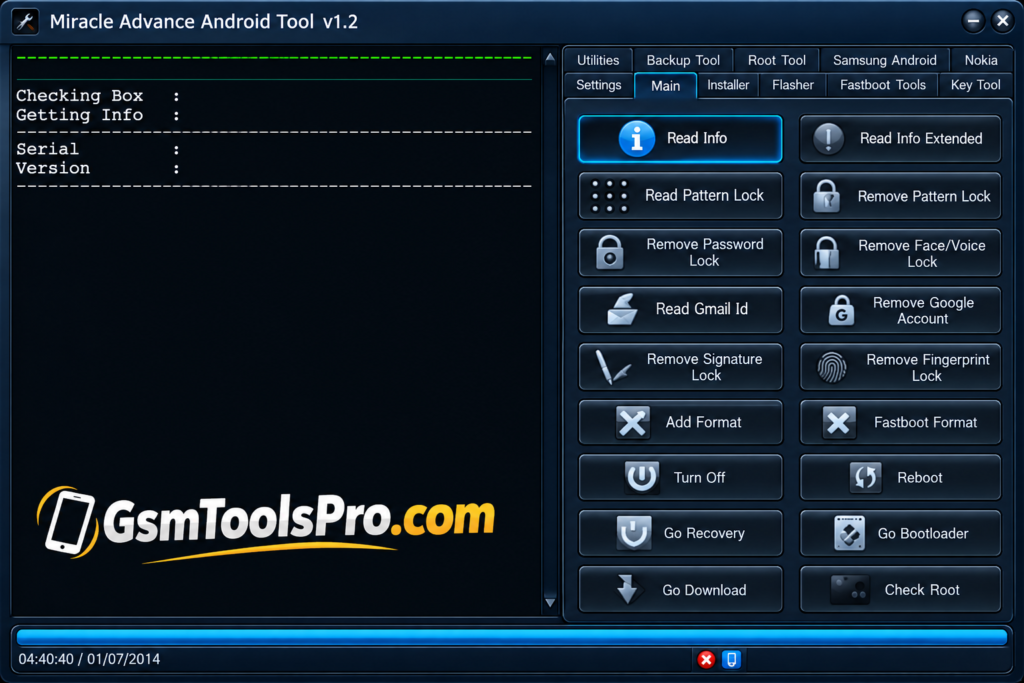
How to Download, Install & Use Miracle Advanced Android Tool?
- Download the Miracle Advanced Android Tool package from a reliable source.
- Unpack the ZIP or RAR archive on your Windows PC.
- Open the extracted folder and run the setup or executable file.
- Install the necessary Android USB, ADB, and Fastboot drivers.
- Start the tool with Administrator privileges.
- Connect the supported Android phone using a working USB cable.
- Choose the required option, such as Read Info, Backup, Flash, or Reset.
- Verify the selected device and operation before starting.
- Let the tool finish the task, then restart the phone if needed.
Pros & Cons
| Pros | Cons |
| Combines multiple Android servicing functions in one interface. | Compatibility can vary by device model and Android version. |
| Supports ADB and Fastboot for common servicing tasks. | Some functions may require specific USB or device drivers. |
| Provides firmware flashing and software maintenance options. | Advanced operations require proper technical knowledge. |
| Includes backup, restore, and device information features. | Incorrect firmware or procedures can cause software issues. |
| Offers FRP, screen-lock, recovery, and root-status options. | Newer Android security patches may restrict some functions. |
| Useful for mobile repair technicians and advanced Android users. | Firmware files may need to be obtained separately. |
Also Read: Octoplus Samsung Tool v.5.1.5 Free Download [2026]
Conclusion
Miracle Advanced Android Tool v1.35 brings Android servicing, ADB, Fastboot, FRP, screen-lock, firmware flashing, recovery, backup, and restore options into one Windows application. For mobile repair technicians and advanced Android users, its simple interface can make supported device maintenance and software repair tasks more efficient from a single toolkit. Before applying any operation mst backups the owners important files becase during the operation anything will be happen.
FAQ’s
Does Miracle Advanced Android Tool support screen-lock servicing?
Yes, it includes screen-lock servicing options for supported Android devices, including certain pattern, PIN, and password-related operations.
Can Miracle Advanced Android Tool repair IMEI on supported devices?
Yes, IMEI repair or restore options are available for supported devices. Use them only for lawful repair with the device’s original IMEI.
Does Miracle Advanced Android Tool work with Fastboot devices?
Yes, the tool supports Fastboot-related functions on compatible Android devices for servicing, formatting, and other software operations.
Can Miracle Advanced Android Tool flash Android firmware?
Yes, firmware flashing is supported on compatible devices when the correct firmware and required drivers are used.
Does Miracle Advanced Android Tool require USB drivers?
Yes, suitable Android USB, ADB, or Fastboot drivers may be required so Windows can properly detect and communicate with the device.
Is Miracle Advanced Android Tool safe to use?
Use it carefully and download it from a trusted source. Scan the installer before running it, especially if your security software reports a threat.